Word count: 1912. Estimated reading time: 9 minutes.
- Summary:
- A stressful journey to England is to be undertaken. The purchase and review of a new TCL television were documented. While the unit’s affordability was noted, quality control issues and poor default picture settings were encountered. Detailed comparisons to other displays were made, suggesting that optimal performance must be achieved through software tuning.
Thursday 2 April 2026: 14:43.
- Summary:
- A stressful journey to England is to be undertaken. The purchase and review of a new TCL television were documented. While the unit’s affordability was noted, quality control issues and poor default picture settings were encountered. Detailed comparisons to other displays were made, suggesting that optimal performance must be achieved through software tuning.
Anyway all that is for later diary entries here. This one will be a quick one: my father has had me purchase a new TV for him because apparently I am an expert on TV purchasing. I went, as last time, to the Reddit Home Theatre enthusiasts list of recommended models and the current cheapest TV on there is the TCL C6K which comes in either a 50 or 55 inch or more sizes, but the 55 inch has better speakers and faster CPU than the 50 inch, so my father opted for the 55 inch mainly due to those better speakers as he is going deaf.
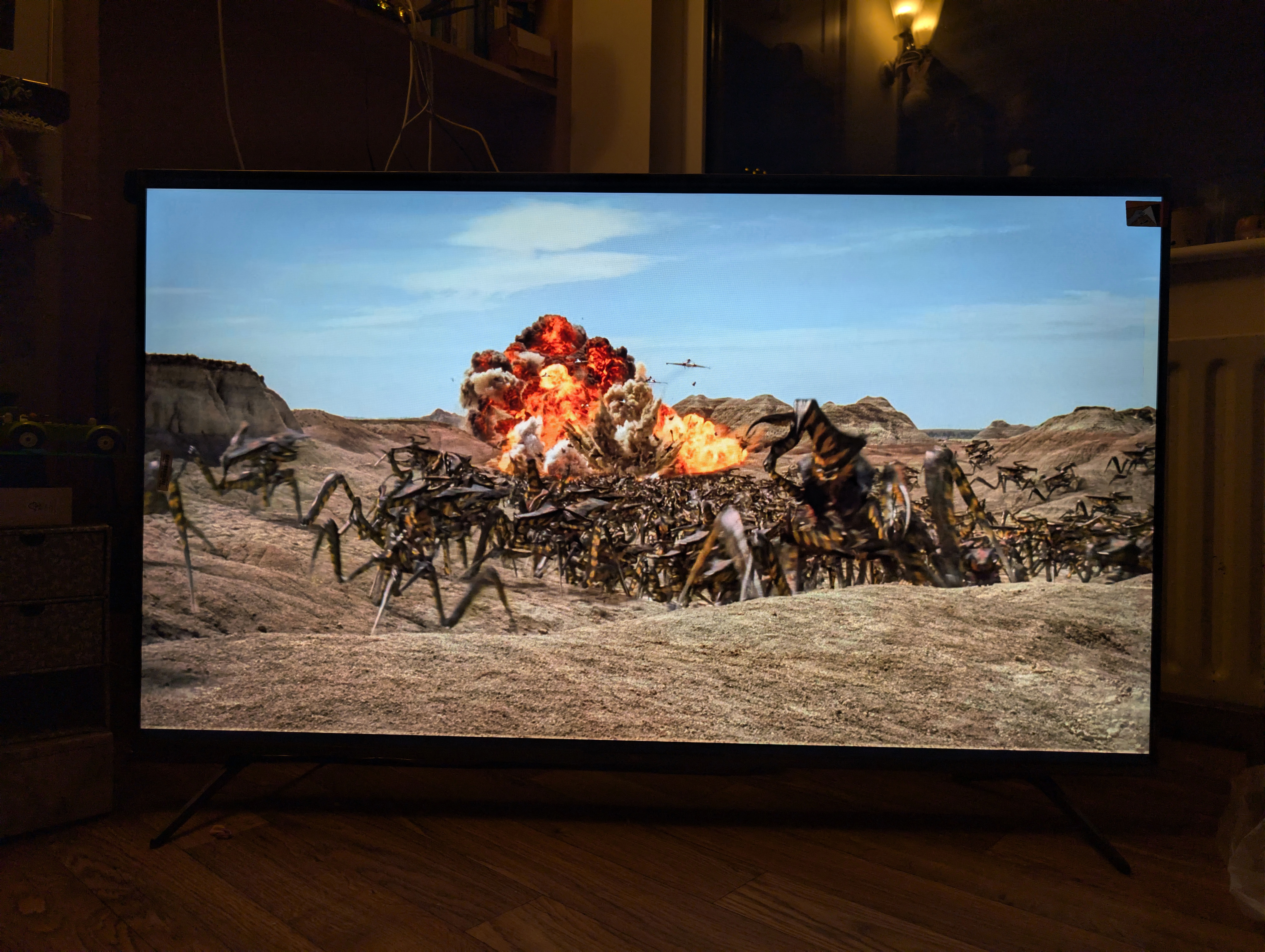
TCL is a Chinese brand well known for supplying high specifications at low prices and not the best quality control, so you need to be extra careful checking the TV on receipt to make sure its screen isn’t full of dead or stuck pixels, that the legs do screw on, and that the case isn’t so warped it won’t lie flat on the wall (these are all commonly reported problems, and thanks to EU consumer law you will get a free of cost replacement – effectively TCL outsources the final check quality control to consumers). If you do get one of the good ones, you get a nearly vanilla Google TV OS installation and a good price for the features. Unsurprisingly, TCL TVs are a mainstay of the Reddit Home Theatre enthusiast buying guides as usually the cheapest models on that list. But that affordability does come with some work for the buyer, and some hidden caveats too …
Everybody online including the professional reviewers agree that TCL TVs come with lousy picture setting defaults. Having seen my first of these TVs, I absolutely agree: I don’t know what they are thinking with the default out of the box settings. So, very first thing you do is apply a standard set of picture settings changes which can be found on Reddit or rtings or many other places. You then do some rinse and repeating with various types of content trying to match the picture to your Macbook Pro’s display as your reference display.
After a few hours of twiddling, you DO get a good looking picture on that TV for Antenna/Satellite content and SD content. Most kinds of HDR content also look pretty good, though somehow the image is a bit ‘flat’ from what I think it ought to be. Unfortunately, anything with Dolby Vision the TV won’t let you adjust most of the settings as they’re locked, and no you can’t override ‘Dolby Vision mode’ for Dolby Vision HDR content. So, perplexingly, all Dolby Vision HDR content looks inferior to other TVs on this TV, despite that I know for a fact given I’ve seen it in other modes that the TV is perfectly capable of displaying a much better rendition of Dolby Vision HDR content if it would only allow you to change the locked settings.
The last time I reviewed TVs was for my then new Panasonic TV almost exactly this time last year. I compared the Panasonic to my previous ancient Samsung TV, which wasn’t very fair, but I didn’t at the time compare it to my current BenQ workstation computer monitor bought in 2021, so let’s fix that now:
| BenQ EW3280U | Philips 65OLED937 | Panasonic TV43W90AEB | TCL 55C6K | |
|---|---|---|---|---|
| Year released | 2019 | 2022 | 2024 | 2025 |
| Screen size | 32" | 65" | 43" | 55" |
| Panel technology | IPS with dimmable LED backlight | WOLED-EX | VA with full array backlight dimming (FALD) | HVA with quantum dot Mini-LED backlight dimming |
| Backlight dimming zones | 1 | 8.3M | 40 | 180 |
| Panel bit depth | 8 bit + 2 bit FRC | 10 bit | 8 bit + 2 bit FRC | 8 bit + 2 bit FRC |
| Panel resolution | 3840 x 2160 | 3840 x 2160 | 3840 x 2160 | 3840 x 2160 |
| Panel max refresh rate | 60 Hz | 120 Hz | 144 Hz | 144 Hz |
| HDR | HDR10 | HDR10, HDR10+, Dolby Vision | HDR10, HDR10+, Dolby Vision, Dolby Vision IQ | HDR10, HDR10+, Dolby Vision, Dolby Vision IQ |
| DCI-P3 benchmarked | 95% | 99% | 96% | 89% |
| Rec.2020 benchmarked | ? | 75% | 73% | 66% |
| Max benchmarked brightness | 350 nits | 1300 nits | 600 nits | 400 nits |
| Contrast | 1000:1 | Infinite | 5400:1 | 6000:1 |
| Viewing angle without distortion (both sides) | 120 degrees | 140 degrees | 50 degrees | 60 degrees |
| Max power consumption | 148 watts | 220 watts | 160 watts | 150 watts |
| CPU | N/A | 4 core Mediatek MT9970B | 4 core Mediatek MT9653 | 4 core Mediatek MT9653 |
| Speaker power | 9 watts | 100 watts | 20 watts | 40 watts |
I feel that the 9 watts of speaker power on the BenQ monitor does it a disservice: its speakers easily beat both the Panasonic and TCL speakers in terms of rendition quality, in fact they’re so good I relatively regularly play music with them and all my Windows gaming and personal movie watching is done via those speakers. I agree that they’re not especially powerful and I usually have the volume well towards the top, but the sound is really very nice out of them, with plenty of bass. Unlike the TCL’s speakers, which are acceptable, and especially the Panasonic’s speakers which are so bad you’d really need that TV up against a wall to make anything out.
I of course took a comparison shot of the exact same scene from Starship Troopers to show you what I mean about the Dolby Vision HDR content looking wrong – unlike the photo above which was taken using UltraHDR, this one was taken as SDR:
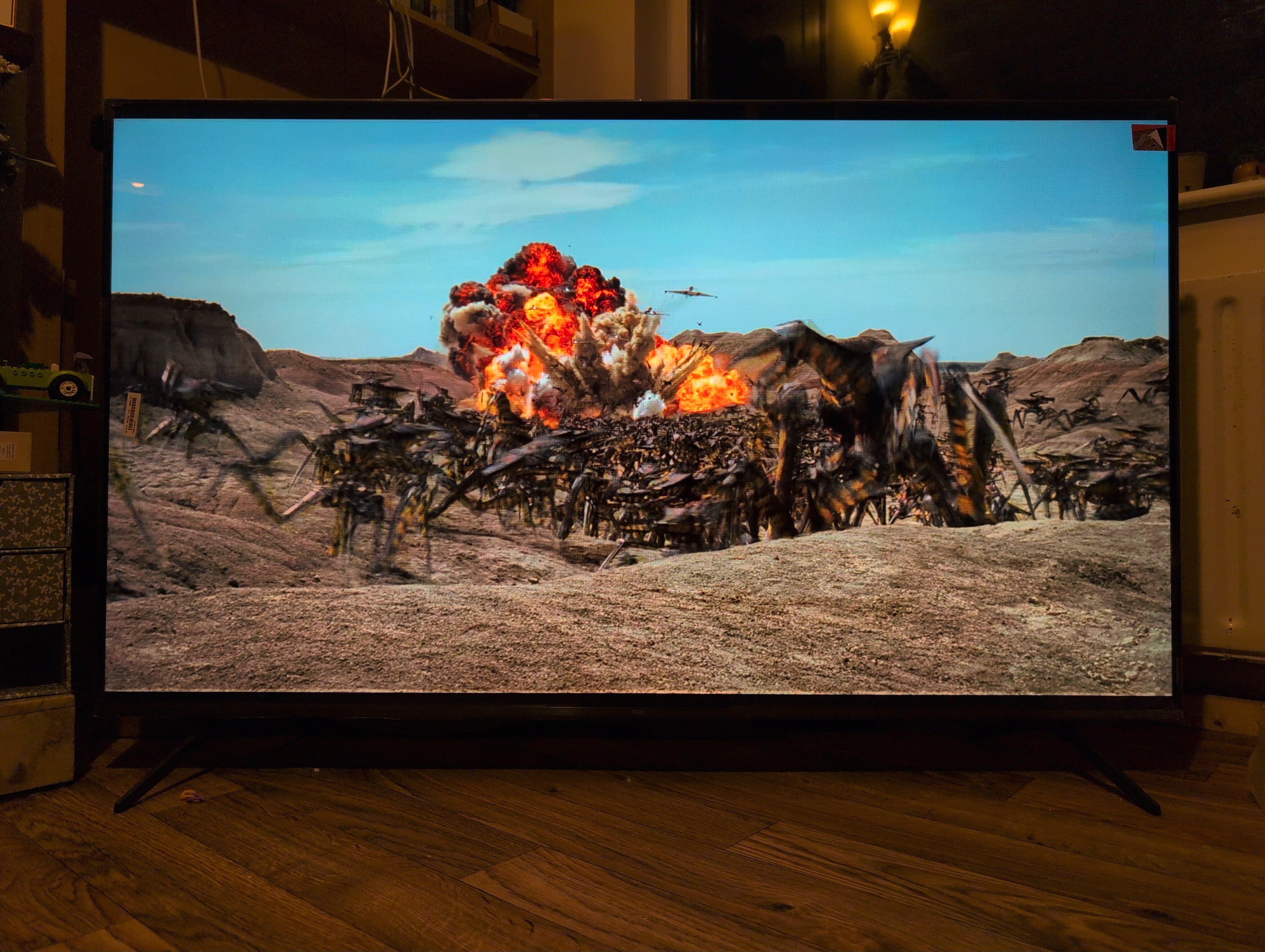
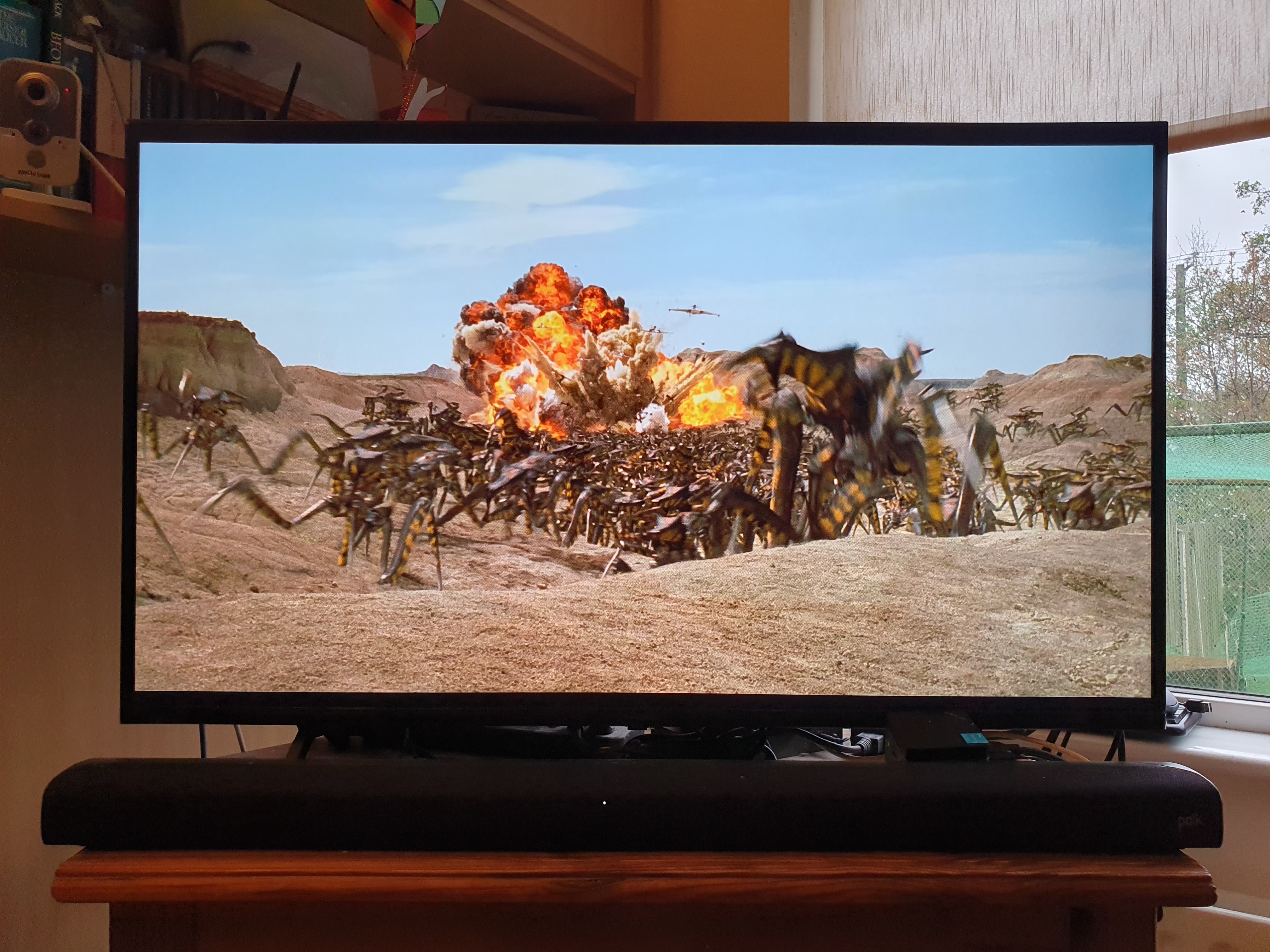
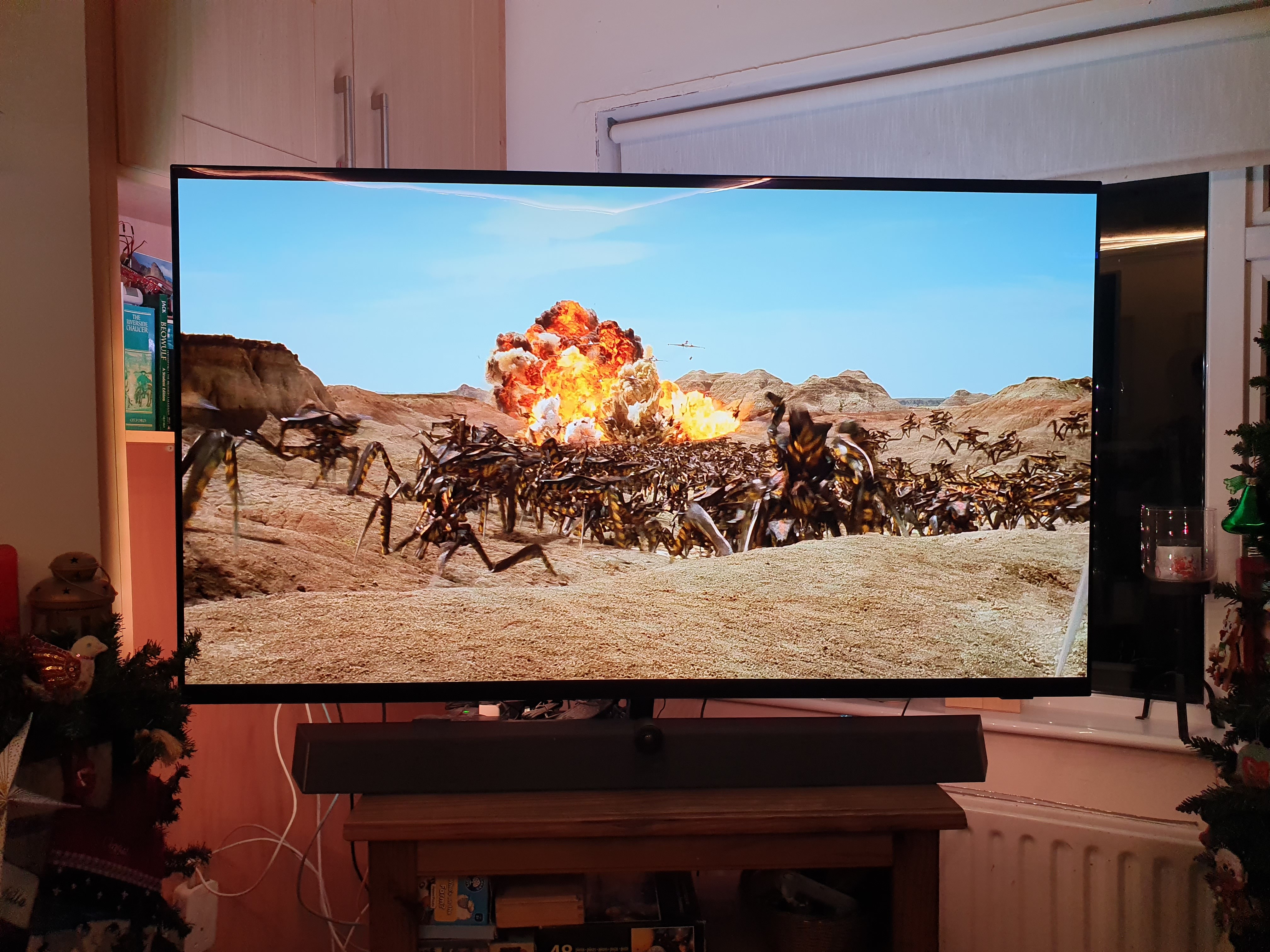
The TCL 55C6K Mini-LED to the left, the Panasonic TV43W90AEB FALD-LED in the middle, and the Philips 65OLED937 W-OLED to the right. Note the sizes of each vary considerably: 55 inch, 43 inch, 64 inch
The Panasonic makes a picture not dissimilar to that of the Philips OLED, which has a spectacularly good picture, despite that its maximum brightness is half that of the Philips and it’s using a much inferior LED technology. The key is, it makes a very honourable attempt: the pictures are comparable to the one on the Apple MacBook Pro. Unlike the TCL, where the picture is just plain not as good: it lacks punch, any wow factor, the image kinda looks flat. I actually bumped up the saturation a little to try and lively up the picture a bit, which does work, but it makes the picture even further off what I think it should be, which is the picture my Apple Macbook Pro makes for the exact same scene.
Looking at the benchmarked not claimed specs above, you can see why: the TCL TV can output 600 nits for test screens, but on real world HDR content it seems to back right off on the brightness so it’s no brighter than my relatively old now BenQ monitor. My BenQ monitor’s HDR rendering is less accurate – at least when driven by either Windows or Mac OS both of which don’t seem to me to be using the right colour profile – but in terms of brightness with real world content they give a similar impression. Absolutely yes in terms of peak spot brightness the TCL is way brighter, but then its software doesn’t appear to often actuate its Mini-LED backlight to peaks except for test images. On top of this, somehow despite the Mini-LED display the colour gamut is lacking relative to any of the other TVs, and you can see that in the measured benchmarks above where DCI-P3 coverage is markedly lower – despite the claims of TCL – which is probably why bumping the saturation a little works so well.
All of which is rather unfortunate: the TCL TVs have the hardware capability, their relatively vanilla Google TV OS is one of the less awful choices for a smart TV, but whoever they have tuning the drivers for these TVs either doesn’t put much effort into it, or they have eyes very different to most other people. In any case, the Panasonic which has less capable hardware than the TCL noticeably makes a superior picture. And I suspect it’s 100% all software as to why.
The TCL 55C6K cost €588 inc VAT and delivery which is way less in inflation adjusted terms than the much smaller BenQ monitor which cost nearly €1,000 in today’s money. The Panasonic cost just €429, but its built in speakers are so bad you couldn’t really avoid the additional soundbar taking the total to €617 inc VAT. So, the TCL despite being 55 inches is cheaper than all the others! And I guess from that perspective this is good value for money, but as with a lot of things you get what you pay for.
As an example of that, my Panasonic and my Philips TVs do some sort of AI upscaling of SD content, so when you’re watching SD content from the satellite, yes it looks a bit blurry in places sometimes due to the low resolution but it’s pretty good. The TCL with the exact same content does not look as good. It does have a picture setting to improve the upscaling, but it looks like it’s basically a smoothing filter and the resulting image looks even more blurry. Another issue I noticed is around mismatched refresh rates, so if you play 24 fps content you will get a really juddery picture on the TCL unless you enable a bit of motion smoothing, but even then the result isn’t as good as telling your playback device to output 24 fps and let the TV sort it out – and now it looks excellent. The Panasonic and Philips TVs do much better with mismatched refresh rates, though playing back at the native frame rate also yields better results for them too.
So all in all I think this is very much a story about the quality of the background driver software which renders your frames, and not having your UI prevent the user from undoing your bad default out of the box settings. All theoretically very easy to fix, yet from what I read online TCL TVs have had these problems for years, so apparently not that easy to fix.
Still, I think Dad will be very happy with it. He’s stepping up from an old 32 inch TV so dim he keeps it in a wooden surround frame to keep surrounding light off it. It also takes about five minutes to get into Netflix, so you start Netflix, go make a cup of tea, and maybe it’s ready when you get back. All that will be fixed with this TCL TV, plus the speakers are loud enough he’ll hear it okay.
Immediately the day after I get back from England the popups installation works will begin, so I’d expect no further entries here for several weeks, and after the popups are installed. Everybody have a great Easter!
| Go to previous entry | Go to next entry | Go back to the archive index | Go back to the latest entries |