Word count: 2050. Estimated reading time: 10 minutes.
- Summary:
- The fibre optic cable was extended by 15 metres with a €15 extension cable from Amazon, and the ONT was moved next to the router. This upgrade did not significantly improve internet speeds, as Pure Telecom’s traffic shaping limits bandwidth to 100 Mbps per connection within ten seconds. However, latency was improved from ~22 to ~8 ms.
Friday 27 March 2026: 20:58.
- Summary:
- The fibre optic cable was extended by 15 metres with a €15 extension cable from Amazon, and the ONT was moved next to the router. This upgrade did not significantly improve internet speeds, as Pure Telecom’s traffic shaping limits bandwidth to 100 Mbps per connection within ten seconds. However, latency was improved from ~22 to ~8 ms.
Yes almost exactly one year ago I was writing here about our shiny new fibre broadband connection which I just had installed into our rented house. In preparation for its installation I had upgraded the Homeplug AV2 1200 powerline network between the ONT and the main router to G.hn Wave 2 and my testing back then was promising in that ~345 Mbit downloads were found. I also noticed at the time some stability problems.
Those stability problems turned out to be the AV2 and G.hn powerline adapters fighting each other – annoyingly, 98% of the time they got on just fine and both performed at full speed. But when they fought, videos stopped playing, internet disappeared, and it cost me some time to figure out it was them that were causing the problems. The obvious solution was to move entirely to G.hn, so I did that and then discovered an unpleasant surprise:
Different networks on G.hn split total bandwidth between them i.e. if total bandwidth is 300 Mbps, each network gets a fixed allocation of 150 Mbps. No, they do not dynamically share the bandwidth like Homeplug AV2.
… which is not documented ANYWHERE, including anywhere I was able to find on the internet. Indeed, if I were a paranoid person, I would say it is striking how little is documented on the internet about this G.hn powerline technology. Had I known this, obviously enough I’d have reverted to the AV2 everywhere, because they’re about the same as half the G.hn speed, and they’re far more predictable as a networking technology (which we’ll get into shortly).
For example, here is the connection between two of my Wifi routers connected by Powerline:
| Powerline config | iperf TX | iperf RX | Ping range |
|---|---|---|---|
| Homeplug AV2 1200 | 75.7 Mbps | 93.6 Mbps | 5-6 ms |
| G.hn Wave 2 2400 (new) single network | 230 Mbps | 296 Mbps | 3-25 ms |
| G.hn Wave 2 2400 (year old) single network | 179 Mbps | 181 Mbps | 3-25 ms |
| G.hn Wave 2 2400 (year old) double network | 87.9 Mbps | 90.8 Mbps | 3-25 ms |
The top two lines are from the benchmarks I took a year ago, and the bottom two are from benchmarks now. As you can see, the G.hn devices definitely have become slower than when they were when new, about one quarter slower. I hadn’t changed their firmware by then nor done anything else to them, and it is not unknown for electronics which pulse rapidly to lose a fair chunk of their birthday performance – thankfully, usually the loss of performance with age slows greatly after this.
That ping range of G.hn devices is just weird, they appear to increasingly lag due to some internal clock getting out of sync with some other clock, then they snap back into sync and the ping times drop again. Smells like bad electronics or bad firmware to me, but in any case they are what they are: as good as you’re going to get without installing physical wires or investing in expensive Wifi backhaul.
As we’re in rented accommodation, we can’t drill through walls. But two months ago I noticed that the door to the front room has a large gap at the top – one big enough to fit a fibre optic cable without drilling. So, the obvious solution to speeding up my internet was to extend the fibre optic cable which enters the ONT, and move the ONT in right next to the router, and then we don’t need to run the house broadband over Powerline anymore. A fifteen metre ONT fibre optic extension cable cost €15 inc VAT from Amazon, so with a pack of easily removable sticky cable holders, I had a solution:

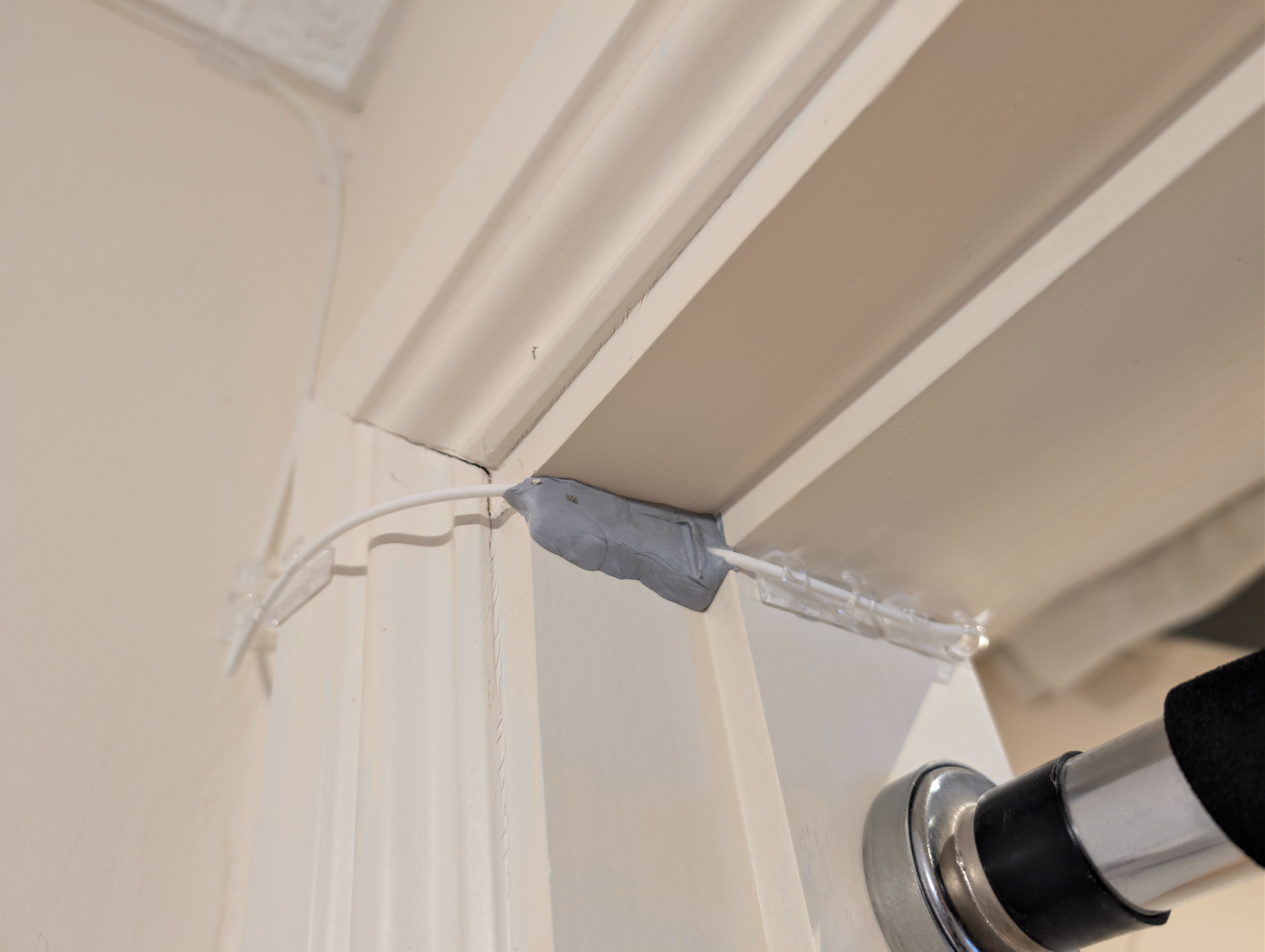

After this upgrade, the internet did not feel much quicker however, and this is why:
iperf3 -R -c speedtest.serverius.net -p 5002
Connecting to host speedtest.serverius.net, port 5002
Reverse mode, remote host speedtest.serverius.net is sending
[  5] local 194.125.92.186 port 33664 connected to 5.178.66.18 port 5002
[ ID] Interval           Transfer     Bitrate
[  5]   0.00-1.00   sec  50.6 MBytes   424 Mbits/sec
[  5]   1.00-2.00   sec  60.0 MBytes   503 Mbits/sec
[  5]   2.00-3.00   sec  60.0 MBytes   503 Mbits/sec
[  5]   3.00-4.00   sec  48.5 MBytes   407 Mbits/sec
[  5]   4.00-5.00   sec  37.8 MBytes   317 Mbits/sec
[  5]   5.00-6.00   sec  25.4 MBytes   213 Mbits/sec
[  5]   6.00-7.00   sec  17.9 MBytes   150 Mbits/sec
[  5]   7.00-8.00   sec  14.6 MBytes   123 Mbits/sec
[  5]   8.00-9.00   sec  13.6 MBytes   114 Mbits/sec
[  5]   9.00-10.00  sec  12.4 MBytes   104 Mbits/sec
- - - - - - - - - - - - - - - - - - - - - - - - -
[ ID] Interval           Transfer     Bitrate         Retr
[  5]   0.00-10.04  sec   343 MBytes   287 Mbits/sec   44             sender
[  5]   0.00-10.00  sec   341 MBytes   286 Mbits/sec                  receiver
As you can see, my current broadband provider Pure Telecom appears to traffic shape each connection so it only gets full speed (500 Mbps) for the first few seconds, then it ramps down to 100 Mbps max per connection within ten seconds. Obviously, they whitelist the main broadband speed testing sites so the ‘connection speed’ appears to be the advertised 500 Mbps. But that’s not what you actually get for real world connections.
Before this upgrade, we got about 85 Mbps in the exact same iperf3 test due to the Powerline in between. But replacing it with fibre didn’t meaningfully matter to bandwidth available, which is unfortunate.
One does, at least, get a large improvement in apparent latency, going from ~22 to ~8 ms:
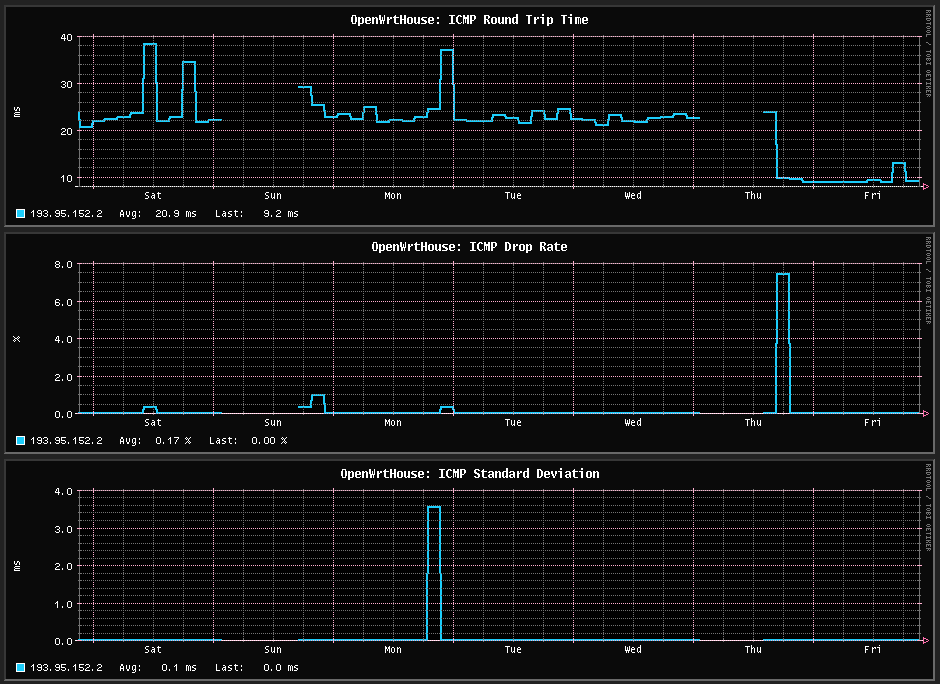
The above is the direct before and after when swapping over to the fibre direction connection. This looks like it should result in a large improvement to internet snappiness, but in fact the G.hn Powerline adapters appear to have much better latency if there is constant load, they appear to desync themselves only when load is light e.g. a ping every thirty seconds. So as a result you don’t really feel the internet going faster, unlike at the site, where the fibre broadband there is noticeably faster both with your phone and laptop.
Looking at the past month:
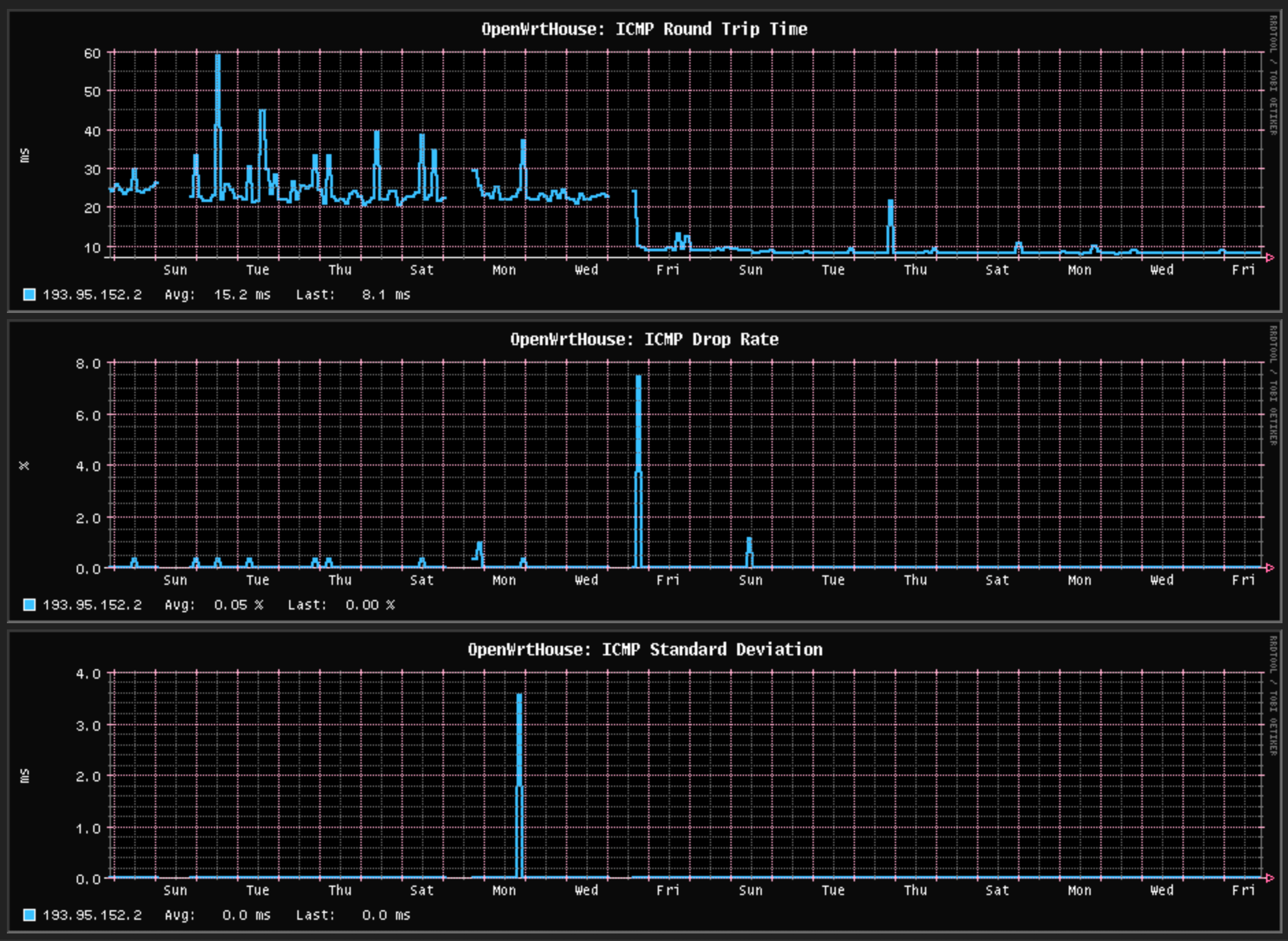
The past two weeks look better than they are, here is the past week:
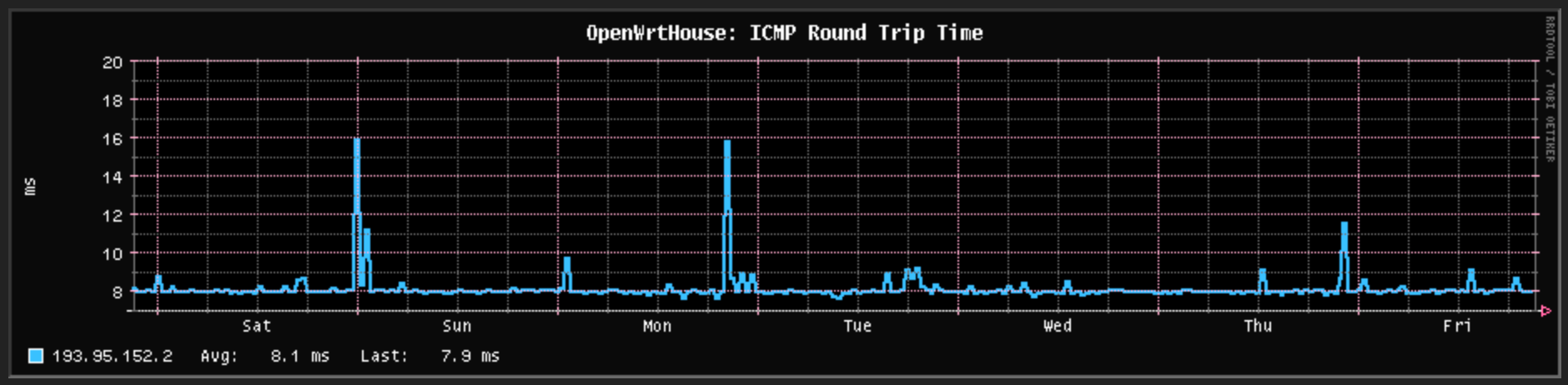
Pure Telecom broadband gets a little congested each evening. As a comparison to the site, which is using Digiweb as its fibre broadband provider:
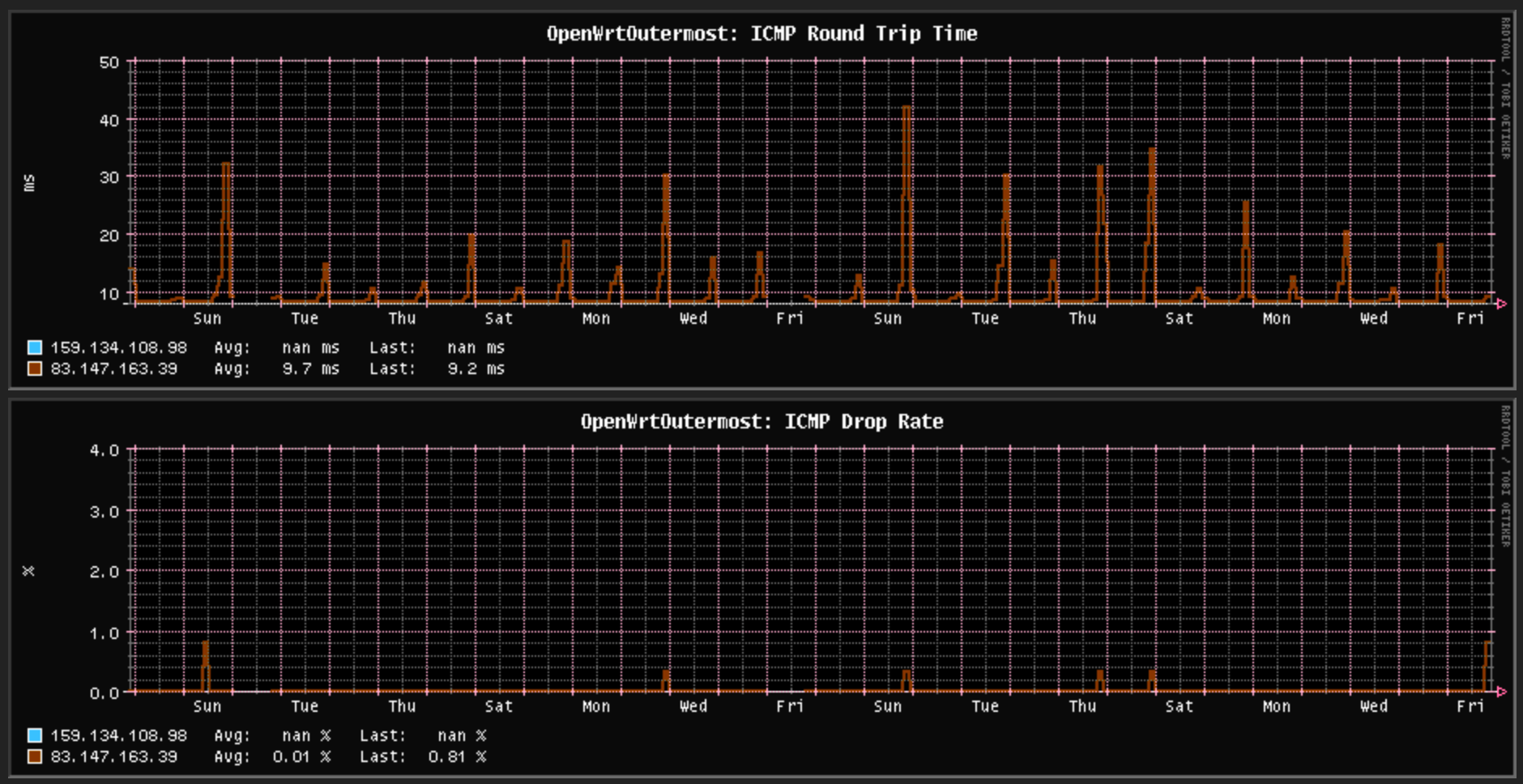
Digiweb has worse congestion problems each evening than Pure Telecom, however they don’t traffic shape:
iperf3 -R -c speedtest.serverius.net -p 5002
Connecting to host speedtest.serverius.net, port 5002
Reverse mode, remote host speedtest.serverius.net is sending
[  5] local 84.203.23.237 port 33658 connected to 194.107.78.3 port 5002
[ ID] Interval           Transfer     Bitrate
[  5]   0.00-1.00   sec  75.2 MBytes   631 Mbits/sec
[  5]   1.00-2.00   sec   108 MBytes   904 Mbits/sec
[  5]   2.00-3.00   sec   106 MBytes   893 Mbits/sec
[  5]   3.00-4.00   sec   108 MBytes   906 Mbits/sec
[  5]   4.00-5.00   sec   107 MBytes   895 Mbits/sec
[  5]   5.00-6.00   sec   107 MBytes   895 Mbits/sec
[  5]   6.00-7.00   sec   107 MBytes   901 Mbits/sec
[  5]   7.00-8.00   sec   104 MBytes   868 Mbits/sec
[  5]   8.00-9.00   sec   103 MBytes   864 Mbits/sec
[  5]   9.00-10.00  sec   101 MBytes   845 Mbits/sec
- - - - - - - - - - - - - - - - - - - - - - - - -
[ ID] Interval           Transfer     Bitrate         Retr
[  5]   0.00-10.03  sec  1.01 GBytes   862 Mbits/sec    0             sender
[  5]   0.00-10.00  sec  1.00 GBytes   860 Mbits/sec                  receiver
That test was performed during a mildly congested evening, I have seen 930 Mbps to the same test server which is Amsterdam based. That’s pretty good for a 1 Gbps connection.
My Pure Telecom twelve month contract is up at the end of March. I don’t regret my choice in them, last year they installed my physical fibre connection for free and they are cheap enough at €35 inc VAT per month. And for the vast majority of their contract, I never could have used more than 100 Mbps anyway, so it was moot that they traffic shape so aggressively.
The chances are I’ll be switching to 500 Mbps Eir Residential in a few days time for €26.67 inc VAT per month for another twelve month contract (so we won’t be moving out now until April 2027! Ha!). I’m curious how much worse it is than Eir Business, which as past entries here showed, had an uncannily flat latency history – there was ultra mild congestion of an added millisecond or two every two months! But that was probably my traffic getting priority from the expensive business package. I guess we’ll find out.
To the best of my current knowledge, the big Irish fibre broadband providers are ranked as follows in terms of network quality:
- Eir (their residential service is untested by me yet, but their business service was just about as perfect as you could get for the year I had it)
- Digiweb (~50 ms ping latencies most evenings especially between 9.30pm and 10.30pm, otherwise very good)
- Sky (never used them personally, but internet says they have less aggressive traffic shaping than Pure, otherwise good)
- Pure Telecom (aggressive per connection traffic shaping, otherwise not bad)
- Virgin Media (I’ve never personally used them, but people I trust say that their network routing is shockingly bad, they appear to not implement peering with other regional networks so your traffic hops over half the planet)
(to be clear, there are also lots of small specialist Irish fibre broadband providers, but they’re all expensive because they don’t compete on price like the main five providers above. Also, to be even more clear, the above ranking is for network quality only and ignores customer service – Eir’s residential customer service is widely considered to be the worst of them all)
You might wonder why am I only ordering a 500 Mbps connection for the rented home when I got a 1 Gbps connection for the site? The reason is that internal Powerline network – at the site, backhaul is 2.5 Gbps fibre, whereas in the rented home the backhaul is G.hn Powerline, and at best you’ll only get less than half of the fibre broadband speed:
| Point | iperf TX | iperf RX | Ping range |
|---|---|---|---|
| Wifi router 1 to main router | 181 Mbps | 173 Mbps | 1-8 ms |
| Wifi router 2 to main router | 202 Mbps | 166 Mbps | 1-8 ms |
I should firstly mention that these results are after the latest firmware (2025) was installed, with the previous firmware being the 2022 version. As you can see, maximum ping times have been greatly reigned in from before and the clock skew desync thing I reckon was the problem before has been fixed. Secondly, because I no longer needed a separate network for the ONT, I repurposed one of those G.hn adapters into adding a third Wifi point upstairs as Megan keeps complaining about the Wifi up there, and I am pleased to confirm that three G.hn adapters in the same network do share bandwidth between them instead of halving it.
Thus, on a good day, you’ll get ~200 Mbps if you’re on one of the two satellite Wifi points and only get ~500 Mbps if you’re on the main router Wifi point. Therefore there seemed no point in paying more for 1 Gbps broadband.
Even with this new firmware, I’m still finding the G.hn powerline somewhat temperamental in a way the Homeplug AV2 never was. Homeplug AV2 was stable and predictable, whereas G.hn Wave 2 has good periods and bad periods. During the bad periods, all ping times across the Powerline network go to ~50-100 ms for sustained periods of time. That might last minutes, or a few hours, then it’ll go back to 1-8 ms. There appears to be no pattern to this which is obvious e.g. microwave use, so I’m going to assume it’s some sort of interference which comes and goes from time to time.
This can make using the internet a bit frustrating sometimes, as it’s so spurious. I still have the Homeplug AV2s, and I am occasionally tempted to swap back to those. After all, they were very predictable.
Next post will probably be about setting out popups for the site, y’all be happy until then!
| Go to previous entry | Go to next entry | Go back to the archive index | Go back to the latest entries |