Word count: 3954. Estimated reading time: 19 minutes.
- Summary:
- A detailed account of an Irish micro solar installation is presented. Technical aspects regarding the “balcony solar” system are discussed, including measurement methods and control via an Anker Solix unit. Legal constraints regarding grid export are addressed, while optimization strategies for bill reduction are detailed. The role of an LLM in system design is also described.
Friday 29 May 2026: 20:03.
- Summary:
- A detailed account of an Irish micro solar installation is presented. Technical aspects regarding the “balcony solar” system are discussed, including measurement methods and control via an Anker Solix unit. Legal constraints regarding grid export are addressed, while optimization strategies for bill reduction are detailed. The role of an LLM in system design is also described.
One major caveat is that we cannot legally export power to the grid in Ireland without gaining prior approval, for which a registered electrician has to submit the appropriate documentation for what they have personally installed. This rules out the type of DIY installed micro solar installation called ‘balcony solar’ which is based on pushing power in the opposite direction via a standard household appliance plug, up to 800 watts as per the legal maximum in many EU countries such as Germany.
As a result, one needs to script and control the overall system to:
- Maximise the electricity not consumed from the grid.
- Minimise the electricity exported to the grid (which is wasted, but also illegal).
The next post in this series (but not the immediately next post, which will be my annual review of hard drive and SSD storage prices) will look at the empirically measured results at the mains meter i.e. bills actually reduced. For that though, I need at least a month of measurements to draw any definitive conclusions, so that last post of the three in the series will necessarily have to wait until sometime next month.
So what is the first thing that we need to ensure we do not export to the mains grid? As mentioned last entry, everybody in Ireland with a smart meter can retrieve the last two years of their electricity usage from https://www.esbnetworks.ie/services/manage-my-meter/view-my-smart-meter-usage with a thirty minute granularity, along with exact counts of kWh used for day rate (8am - 5pm, 7pm - 11pm), peak rate (5pm - 7pm), and night rate (11pm - 8am). For non-obvious reasons, these lag by four days or so, so if I went to that site right now I could see usage data only up to the 24th or 25th. This is useful for checking if a solution is accurate, but it is not the solution itself. What we need is a much more immediate way of reading current mains grid consumption power.
Locally reading the mains grid meter
Many years ago we had a thing called an OWL which had an AA battery powered clamp remote unit you could install in the meter box, and its main unit had a big LCD display showing the exact power being used right now. It had a USB port, and you could plug it into a PC and read the live data. It worked very well for about five years, but then one day stopped reading data which I had assumed was the remote unit failing, so it went off to electrical recycling heaven.
OWL seemed to have trebled the price since then, and not upgraded the system so you’re still stuck with its USB interface. This is annoying, the remote unit was a standard 433 Mhz low power transceiver and once upon a time you could cheaply buy a generic USB transceiver for those. But apparently no more – I couldn’t find any of that technology cheaply, and its driver support in Linux was very questionable. In short, it is abandoned hardware and especially at the trebled price it was a bad purchase.
I naturally then gravitated towards something Zigbee or Z-Wave based as both are low power enough to run off AA batteries for months, with Zigbee being the cheaper option, because I can’t install wiring into a rented house so wireless and battery powered is my only option. There are several affordable clamp-based Zigbee meters available, but for some inexplicable reason they all require mains power to work which would require me to rewire the mains meter box. As this isn’t my house, I can’t do that, and because they only take AC 230V, I can’t wire in a battery box either.
I eventually landed on the only cheap option remaining: a pulse counter. Smart mains electricity meters have a little LED on their front which flashes every one thousandth of a kWh. You can attach a pulse counter which records every one of those flashes, and from that can calculate the current number of watts being imported. There are several options for these devices, I went with the Frient Electricity Meter Interface 2 for about €35 inc VAT delivered, and it does exactly what it says on the tin: the meter flashes, it updates its Zigbee state, anything subscribed gets notified. It turns out to be very accurate overall – just 0.72% deviation from the ESB readings over a month – but it is prone to instantaneous overestimation i.e. it’ll report, for a short while, far more mains power usage than is correct. It’ll then self correct, and given enough time it balances out to within one percent of correct:
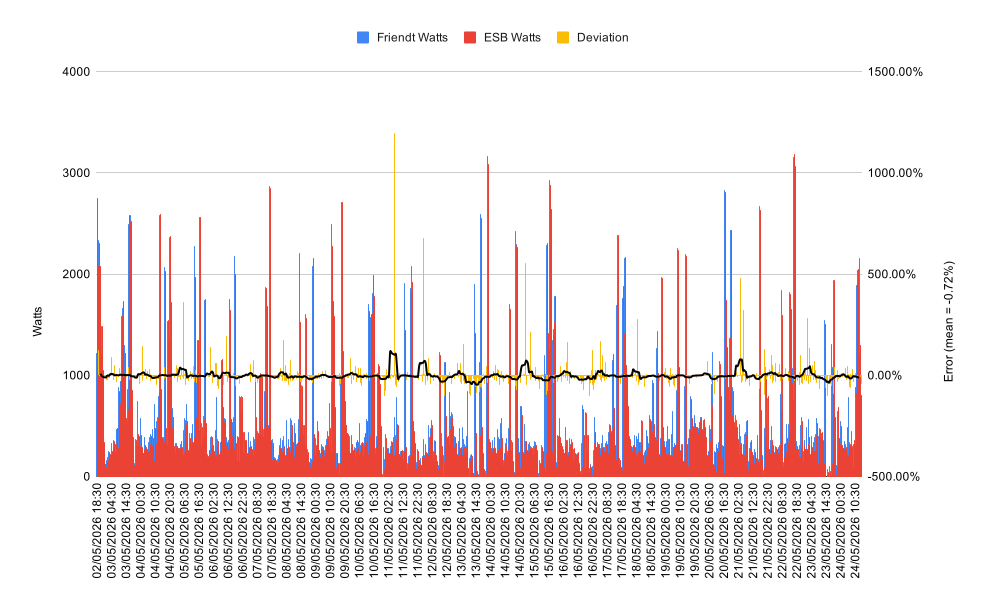
I have tried to see a pattern to when it deviates, but I can see nothing obvious and the fact that it does recover over time makes me think it’s possibly a suboptimal choice of algorithm. Big overestimation spikes are followed by extended spells of mild underestimation until the total count evens out. That said, I’ve never implemented one of these before, and maybe it’s harder to implement than it looks?
There are obvious limitations to pulse counting: the first is that by definition we cannot detect export to the grid as the meter LED does not flash if exporting power. The second is that resolution is very lousy at low power usage:
| Power (watts) | Seconds between pulses (i.e. measurement lag) | |
|---|---|---|
| 1000 | 3.6 | |
| 500 | 7.2 | |
| 250 | 14.4 | |
| 125 | 28.8 | |
| 60 | 60 | |
| 30 | 120 |
As you can see, it must take a minimum of half a minute to detect 125 watts of mains grid usage, and a minimum of two minutes to detect 30 watts of mains grid usage. As is very obvious, this means that the closer we get to exporting to the grid, the exponentially worse instantaneous resolution our pulse counter has. This is very unfortunate, but I am unaware of any better solution under €150 which doesn’t require modifying the wiring in this rented house, so it will have to do.
Getting the Anker Solix Solarbank E1600 data into a local MQTT broker
One of the more annoying things about the Anker E1600 battery box is internally it uses bog standard MQTT for pub-sub communication with the Anker cloud and the Anker mobile phone app. That makes it straightforward to write a web client which subscribes to the MQTT feed (https://github.com/thomluther/anker-solix-api is probably the most popular and best supported implementation), including a straightforward ‘replicate this MQTT from the Anker cloud to my local MQTT broker’. The reason that this is annoying is because the Anker cloud is completely unnecessary here, the device could connect to a local MQTT broker and skip the cloud entirely. But no, Anker didn’t enable that trivially easy thing to enable in its firmware, so we are at where we are at.
I took one of the examples from the github repo above and adjusted it to replicate all MQTT updates to a local MQTT broker. This isn’t Niall’s coding at its finest, but it’s been running trouble free for a month now so it’ll do:
#!/usr/bin/env python3
"""Example: E1600 MQTT integration with monitoring and control."""

import asyncio
import logging

from aiohttp import ClientSession
from api.api import AnkerSolixApi  # pylint: disable=no-name-in-module
from api.mqtt_factory import SolixMqttDeviceFactory  # pylint: disable=no-name-in-module
from api.mqtt_solarbank import SolixMqttDeviceSolarbank  # pylint: disable=no-name-in-module
from aiomqtt import Client
import common

_LOGGER: logging.Logger = logging.getLogger(__name__)
CONSOLE: logging.Logger = common.CONSOLE
MODEL = "A17C0"
MQTT_BROKER = "192.168.x.x"
MQTT_PREFIX = "Solarbank"

class Device:
    def __init__(self, queue, mqttdevice : SolixMqttDeviceSolarbank):
         self.mqttdevice = mqttdevice
         self.queue = queue
         self.last_items = {}

    def topic_updated(self, *args, **kwargs):
        for k,v in args[6].items():
            if k not in self.last_items or self.last_items[k] != v:
                self.queue.put_nowait((k, v))
                self.queue._loop._write_to_self()
                self.last_items[k] = v

async def main():
  async with Client(MQTT_BROKER) as client:
    async with ClientSession() as websession:
        myapi = AnkerSolixApi(
            common.user(), common.password(), common.country(), websession, _LOGGER
        )
        CONSOLE.info("Checking for devices...")
        await myapi.update_sites()
        await myapi.get_bind_devices()
        device_sn = None
        for sn, device in myapi.devices.items():
            if device.get("device_pn") == MODEL:
                device_sn = sn
                CONSOLE.info(f"Found device: {sn}")
                break

        if not device_sn:
            CONSOLE.info(f"No device ({MODEL}) found")
            return

        queue = asyncio.Queue()
        device = Device(queue, SolixMqttDeviceFactory(
            api_instance=myapi, device_sn=device_sn
        ).create_device())
        mqttsession = await myapi.startMqttSession(device.topic_updated)
        if not mqttsession:
            CONSOLE.info("Failed to start MQTT session")
            return
        mqttsession.subscribe(f"dt/anker_power/{MODEL}/{device_sn}/state_info")

        CONSOLE.info("Topic subscribed, awaiting topic updates ...")
        while True:
            for n in range(0, 100):
                k, v = await queue.get()
                CONSOLE.info(f"{MQTT_PREFIX}/{k} => {v}")
                await client.publish(f"{MQTT_PREFIX}/{k}", payload=v)
            # Republish unchanging values periodically
            device.last_items = {}

if __name__ == "__main__":
    try:
        asyncio.run(main(), debug=False)
    except Exception as err:  # pylint: disable=broad-exception-caught  # noqa: BLE001
        CONSOLE.info(f"{type(err)}: {err}")
I wrapped that into a docker image and wrote a little docker compose stanza for it so it launches with OpenHAB, and that’s how I built the OpenHAB dashboard you saw in the last post – it’s just values from MQTT. OpenHAB has been told to record readings into a SQLite database, and from that I generated the graph above comparing the Frient pulse counter readings to those from ESB Networks.
Controlling the system
You may remember from a few posts ago me extolling the virtues of a 196b LLM called Step 3.5 Flash which is designed to work well on consumer hardware. Well, it turns out not only does it name personally members of the Chinese Communist party when describing alleged incidents of impropriety, it’s also not half bad at software engineering. So I plugged it into Visual Studio Code as my coding assistant, and told it to go research a design which would solve controlling this system. It went off scouring the web including reading through all the German Balkonkraftwerk discussion forums AND all the datasheets for my specific devices, and then constructed a very feasible design plan. I prompted it with a few ‘stupid’ questions to help it improve its design, then I let it loose implementing the solution.
Step 3.5 Flash isn’t very good at writing code, it makes a lot of mistakes, but it realises its mistakes quickly enough and keeps iterating until they’re all fixed. That, combined with voluminous thinking token output, means it burns through the tokens quickly. It certainly chewed through 500 million tokens with ease, costing me about $14, and it ran for a few hours including live running the control program against the real hardware, interpreting the log output and/or launching the program under the debugger, fixing bugs and improving its test suite, until it declared that it felt it had a working control program.
I was suitably impressed if I am honest. This LLM runs well on consumer hardware with enough RAM e.g. a Mac Book with >= 128Gb of RAM. It’s not up there with Claude Opus, it makes far more mistakes and generates oodles of thinking tokens, but if I’m not paying by the token this is something you can give it a job to do, go to bed and when you wake up it’ll have something potentially production ready to go. That’s impressive and it gets me excited about the future for when I need working code and I don’t really care about its performance nor security e.g. local device control code.
Step 3.5 Flash was released last February, and by pure sheer coincidence its next iteration landed this morning: Step 3.7 Flash. It’s better across every metric whilst staying within the 200bn parameter limit, it’s still fast on consumer hardware with at least 128Gb of RAM, and it can now also see (i.e. it has gained vision). It writes better quality code first time, outputs far less thinking tokens, and unsurprisingly local LLM enthusiasts are all very excited – I myself was busy poring through the benchmarks and documentation at 7.30am this morning despite being just awake. I’m sure I’ll be writing here more about that LLM, but to return to the point, Step 3.5 Flash did a pretty good job at getting this solved with minimal oversight from me.
Unfortunately, as I mentioned last diary entry, we came foul of the Anker box finding the APSystems inverter controlling output to be unacceptable and the cause of occasional error states where all output power is cut until somebody clears the error by pressing the button on the front of the box. So my $16 of OpenRouter spend ended up being wasted, which was annoying, though it did gain me my first experience of end-to-end agentic AI software design and implementation.
Controlling the Anker storage output instead
The Anker battery storage can be told to output any wattage value you choose with a ten watt granularity, but it is via its timed program facility i.e. you tell the Anker cloud that between X time and Y time the battery shall output Z watts. The next time that the device pushes an update to the Anker cloud, it’ll look at the current output and if it is not what it is supposed to be, it pushes a command to the storage to adjust its output. This seems to have an update frequency no better than one minute, and more usually like ninety seconds. Given that the Frient meter has a lag of a minute or so, and so does output control, and that most large electrical loads like an oven work by a relay switching on and off (i.e. all on, all off), by the time you’ve told the system to increase output the device consuming it will have stopped, and now you’re exporting to the grid and wasting power.
As mentioned last post, you can control the Anker battery storage via Bluetooth instead, and at least there you can push new output levels pretty much instantly and they’ll apply. I read online that the Anker device responds within seconds, so IF you had a sensitive and responsive mains power clamp AND you controlled this via Bluetooth, I think zero export power is achievable. But I am missing both, so that won’t work in my situation. We will need an alternative solution!
Back to the drawing board
Throughout all this high systems engineering, I began to wonder if I am overcomplicating the control of this system? Yes, in a traditional battery storage powered inverter you want to have the system output as close to what the house is using so mains power consumption is as close to zero as possible. But this particular micro solar installation has a unique aspect: it has just 1.6 kWh of battery storage. And here’s the revelation: it doesn’t matter which day and peak hour kWh you offset, they all cost the most.
If you therefore have the battery discharge at a low, fixed, rate during day and peak hour rates after the sun goes down so that it is empty by end of day rate, you don’t need to do anything more. You’re already maximising your bill savings. So complicated control programs aren’t necessary so long as that low, fixed, rate is at or below the house’s baseline power consumption.
I’ve ended up configuring the system as follows: at 5pm when peak rate begins, the battery always starts to discharge at 220 watts. After conversion losses, that turns into almost exactly 200 watts being pushed by the inverter into the house. You may remember from the last post that I wired my best panel directly into the inverter, and the other three panels into the battery storage, so during daylight hours you typically see 80-300 watts from that single panel while the battery storage charges, after it is full you see a varying depending on cloud cover 240-700 watts from all four panels up to 5pm each day, then you get the ~200 watts from the battery plus whatever the single panel adds during the beginning of peak rate hours.
At a 220 watt discharge rate, and given that the battery stops discharging at 5% capacity, you will consume the battery after 6.91 hours. If starting at 5pm and stopping at 11pm, you should have 17.5% of battery capacity remaining of which 12.5% is usable. The battery turns on again at 8am, and usually reaches the 5% shut off a little after 9am (it depends on how much charging it does 6am - 8am).
This should be fairly optimal from a bills reduction perspective. It could be better, but it’s also not terrible: a kWh is a kWh, so long as our 200 watts battery output doesn’t exceed what the house uses.
As we saw in the half hourly electricity consumption graph last entry, we’re usually using at least 400 watts from 3pm onwards each day. So we’re all good on the bills reduction part, except of course for what happens between the battery getting full and 5pm each day.
To clamp output or not to clamp: that is the question
You can tell the Anker box to clamp its output after its battery is full so one never exports to the grid. However, if you think about that, that isn’t bill minimising: what you actually want to do between battery full and 5pm each day to minimise bills is push into the house everything the solar panels can gather. Then if say somebody runs the dishwasher, or the dryer, as many billed day rate kWh as possible get offset even if it means contributing kWh to the grid for no compensation. After all, once the battery storage is full, any kWh not reaped from the solar panels goes to waste in any case, so if they might potentially reduce your mains grid consumption you’re better off expending them on that than not using them at all.
Obviously that would be illegal, so you shouldn’t do that. However reading online I find that for low contributions, the ESB’s monitoring equipment at the nearest substation will never notice anything as other houses on the same ring will consume any power you export. So the only thing which could notice is your smart meter, and for some reason in Ireland the smart meters are explicitly configured to not count exported kWh unless activated remotely to do so. You can check your smart meter’s counts for day, peak, night and export by pressing the button on its front.
So, in other words, the ESB have configured their smart meters to intentionally not notice any kWh exported unless you get your connection upgraded to an export counting connection. Or, put another way, they’re apparently glad to take free electricity if they don’t have to pay you for it, so long as it is amounts that are less than what their substation emits (from reading online, if a substation ever sees negative flow it shuts down, triggering alarms at ESB Networks HQ, which I assume means that the installed capacity of solar power exporters per substation can never exceed half that of the substation).
What’s next?
The next entry will be my traditional annual entry on the inflation adjusted history of storage prices for spinning rust and flash memory. I’ll likely write that tomorrow or Monday.
I have the spreadsheets set up to analyse the ESB Networks raw data, so I should have some pretty graphs to show in the next entry in this series on balcony inverters which reveal just how much bill savings there were in the months of April and May. Expect that sometime in June.
If anything happens with the house build – ha! – it might gain mention here.
Finally, at the end of June will be the end of an era, and I think I’m going to do a special diary entry on here about it. The EU will be introducing a €3 per item tariff on small packages from outside the EU after the end of June. This means the end of cheap stuff imported directly by EU consumers, and in my particular case it’ll mostly mean the end of me buying stuff from the likes of Aliexpress as they won’t be cheap anymore.
Knowing that this is coming, I have been wracking my brains thinking of what to buy from Aliexpress before the deadline (the items must cross the EU border before 1st July to avoid the tariff, so I can’t really order anything new after the end of May). I have bought the following items recently:
- Any components that the house would use which hadn’t been purchased yet in sufficient quantity, which turned out after a survey to be: seven more DC dimmer switches, thirteen more BTS7960 H-bridges for the ventilation boost fans, and sixteen more GA12 N20 blind motors. Not much cost – if bought now – so I’m glad that’s done.
- Current inrush thermistors to perhaps prevent some of the 54v to 24v DC converters from blowing their fuses which has been happening occasionally on the site. These are very cheap components – on Aliexpress – and may solve the problem.
- Two new types of DC dimmer, one a wall switch type cheaper than the ones I’ll be fitting to the house, and one ultra cheap inline wire type.
- A snubber to fix the transient voltage shutdown problem at the site where if I try using the power washer, the Sungrow inverter cuts out complaining about overvoltage. I think that is caused by inductive voltage spikes from its motor. In any case, I’ll be constructing a plug in snubber box to work around the issue which I’ll show and tell here.
- Many years ago now I expensed to the business the purchase of a used Fluke LRAT-2000. It has a SFP cage and can test fibre, but I’d never got round to getting a compatible SFP fibre transceiver for it, so I thought I ought to get that solved before the Aliexpress close deadline as I’ll need to assemble several small parts each of which would get a €3 tariff later.
- And lastly, and it’s a bit silly but shows exactly why the loss of cheap Aliexpress is going to be a pain, I will be doing some furniture work to convert an old TV cabinet from my father’s house into a set of drawers. I have a sheet of Chinese coated plywood for the new shelves and back, and to fix the back and those shelves I’ll be using some cheap fixings from Aliexpress which cost very little, but aren’t things you can get over here easily or if you can, they are priced with a very hefty markup.
And that’s the annoying thing with this new EU tariff: I totally get that it puts EU based vendors at a disadvantage as they can’t compete on price. But they sell the exact same Chinese made stuff as Aliexpress, just usually with a 50-100% markup e.g. Amazon is chock full of identical items to Aliexpress, just usually a good bit more expensive. So we’re all going to have to pay more for the same stuff going forwards which does feel rather like the Corn Laws in the 19th century. It certainly is worse for the majority, to the benefit of a few.
I do expect to continue to use Aliexpress for items you just can’t get elsewhere: those DC PWM dimmers are an excellent example, the only other source for those I found was German units costing €120 each whereas the high end model from Aliexpress cost €17 each delivered. I also remember a fun time trying to find little metal cogs for the blind motors, and they were utterly unsourceable in quantities less than a thousand except from Aliexpress. For this type of thing, Aliexpress will remain king going forwards, and I’ll just have to pay the €3 tariff.
| Go to previous entry | Go to next entry | Go back to the archive index | Go back to the latest entries |