Word count: 9311. Estimated reading time: 44 minutes.
- Summary:
- The solution to securing cryptocurrency wallets against theft, fire, and flood involves using physical security solutions such as safes or vaults that are certified for fire and flood protection, and storing the paper backup of private key words in a form that is useless to anyone but the owner. This implies more cryptography, specifically generating printable QR codes and parity-protected encrypted backups of BIP39 backup word lists.
Thursday 1 January 2026: 20:58.
- Summary:
- The solution to securing cryptocurrency wallets against theft, fire, and flood involves using physical security solutions such as safes or vaults that are certified for fire and flood protection, and storing the paper backup of private key words in a form that is useless to anyone but the owner. This implies more cryptography, specifically generating printable QR codes and parity-protected encrypted backups of BIP39 backup word lists.
This post will explain how existing solutions suck, and the solution I’ve come up with which I think solves the problem.
The problem with securing cryptocurrency wallets
Almost all cryptocurrency is based around asymmetric cryptography which is the kind of cryptography that lets a person publish a public key by which anybody can encrypt a secret, but only the person with the matching private key can decrypt that secret. So, as an example, if Alice wants to send five Ethereum to Bob, fundamentally speaking under the bonnet what happens is Alice encrypts a secret using Bob’s public key, and only Bob can decrypt that secret. Thus a one way transfer of Ethereum is achieved.
These public-private key pairs are surprisingly short, only thirty-two bytes long. I went to https://bip39.onekey.so/, one of many online cryptocurrency wallet key generators (WARNING: never, EVER use any online service to generate your wallet keys!), and asked it for a new wallet key for the Ethereum cryptocurrency. It gave me this:
Wallet address: 0xb3142e11aDA222ca7F646B090843fE4d0f19409E (128 bits)
Public key: 0x0367f9b38a5a1831c67690f1c72096cde62ab8dc8d4810274a7b30c97b52e43186 (256 bits)
Private key: 0xb996d0b8e83bd64b7672898229d74f746ee584d87bfa168f7cbbe8743dca8456 (256 bits)
BIP39 recovery phrase:
- swear
- affair
- copper
- soup
- illness
- donor
- approve
- vacuum
- razor
- rally
- door
- fruit
- slow
- grant
- anchor
- debris
- lecture
- urban
- drive
- sausage
- say
- milk
- echo
- autumn
This latter sequence of words is all most cryptocurrency wallet users ever see of the underlying mathematics – they encode the private key shown above, and from that private key the public key and the wallet address can be calculated. Almost all cryptocurrency wallet implementations provide at least an optional BIP39 based backup facility whereby the user will be given a set of words to write down on paper like those above. They will be told in no uncertain terms to never, EVER, put those words into any device with an internet connection.
Of course, many cryptocurrency users don’t take heed of such advice, and keep their backup words list in a text file, or surprisingly even in a Docs file on Google Drive. Adversaries write scripts to search for word lists in BIP39 format in copy and paste clipboards, anything a web browser extension or program has access to, including search indices.
The problem with a thirty-two byte long secret is just how short it is. It is open to so many types of attack, everything from timing based attacks to long distance microphone based attacks to human based attacks. This is of course the same problem for all cryptography, which is why if you’re still doing any crypto authentication which requires using your private key on an internet connected device you are just asking to get hacked. The obvious solution is to never, ever, do cryptographic operations on an internet connected device. Thus enter …
Hardware cryptocurrency wallets
I’ve waxed lyrical on here before about the importance of holding all private keys exclusively on hardware not connected to the internet and since 2019 or so, all my SSH and Gnupg auth has been done by USB connected secure keyfobs with a physical button – specifically the YubiKey which is supposedly manufactured in Sweden for EU sales and therefore supposedly other nation states would find it harder to fiddle with it. It took quite a bit of effort back in the day to configure those to quack properly as gnuk auth keyfobs, but once so configured, they’ve been utterly trouble free, and they work exactly the same whether you are on Windows, Mac OS, Linux, Android or iOS. Every single time they perform an authentication, somebody must physically press a button on the keyfob. Which means that they are useless to remote attackers unless somebody is present to press the button. Therefore, if somebody wants to get into my secure services, they need to do one of:
Get physical access to that secure service e.g. to the colocation data centre where my Raspberry Pi servers live. Even then, they’d only get access to that server alone.
Physically steal one of my Yubikey keyfobs, and then before I notice and cancel its access do one of: (i) physically extract the private keys from the hardware, which is within the capabilities of some high end nation states or (ii) unlock the keyfob using the PIN I type in every time I cold boot it, which means they need to have been running a keylogger on my devices.
… which is probably too much trouble for most attackers given how little value there would be getting into my secure services.
However, the insecurity profile for hardware cryptocurrency wallets is not the same as for SSH intrusion into secure services:
Firstly, losing access to servers is recoverable – I can have those colocated servers sent home, wiped and rekeyed with new keyfobs and sent back and the only negative thing which happens is outage. If cryptocurrency wallets get compromised, damaged or lost, you lose all your money and that’s it gone forever – no recourse, no recoverability. That raises the stakes and the costs of a single mistake significantly.
Because hardware anything goes wrong and keyfobs can get lost or damaged, and if it does then you’re hosed, you will be very strongly incentivised to write down the private key on paper as you are told to do by the hardware keyfob makers. That bit of paper can be stolen, or lost in a fire or a flood.
If the money value is high enough, a motivated attacker will quite happily kidnap your children and point a gun at their heads until you use your keyfob in front of them to perform a transfer, so that side of things should be borne in mind as well – locking up the crytocurrency in a smart contract which imposes a delay on removing it would be wise. Staking in Ethereum can come with up to a forty day withdrawal delay – this is annoying for small value holders, but for the ultra wealthy that’s a feature not a bug.
So, basically, the stakes with hardware cryptocurrency wallets is much higher than for authenticating keyfobs, even though both do exactly the same thing from an engineering perspective.
While it is absolutely possible to use your gnuk keyfob to implement cryptocurrency wallet signing (and some do exactly that), it is undoubtedly more convenient to use a dedicated solution. The three most popular retail consumer hardware cryptocurrency wallet solutions in order of market share at the time of writing are:
Ledger Nano is an e-ink and touchscreen based device powered by USB.
Strengths:
- The screen is a high density panel and lets you easily verify every signing request to ensure it is legitimate (i.e. no man in the middle software is intercepting your signing request and replacing it with its own).
- The UX is probably the best of all hardware solutions listed
here: it’s easy and intuitive to use, and no faffing around.
Weaknesses:
- There is a lot of hardware to go wrong: Screen, Touchscreen, and the flash storage for its firmware will bitrot over time.
- The private key on device can be retrieved over USB at any time, which some feel is an unacceptable vulnerability (and I would agree).
- The firmware for the secure element is closed source, so nobody can easily say if the manufacturer claims match reality.
- It is by far the most expensive solution here at nearly €200 inc VAT, which means buying several of them and making them into redundant clones gets very pricey very quickly. Given as another recent post showed you can buy a very reasonable for the price Android tablet for under €40 inc VAT delivered, I personally find €200 too much. Its popularity despite the cost is because it was originally a Kickstarter project and it arrived to market well before everybody else, and they’ve since raised the price considerably. They do have a cheaper tiny OLED screen based model, but to be honest that model is inferior in every way to the Trezor below, so get that instead.
Trezor Safe 3 is a small OLED screen push button based device powered by USB.
Strengths:
- There is less hardware to go wrong, but still some.
- You cannot retrieve the private key over USB, only via its tiny low resolution OLED display.
- The entire firmware stack including for the secure element is open source, which means their marketing claims are probably true.
- The tiny low resolution OLED display does still display what you are signing so you can verify no man in the middle attack is occurring. It’s kinda a pain to be honest, you need to do some scrolling and staring and the text is not big for these old eyes.
- If you enter the unlock PIN wrong sixteen times, the device factory resets itself.
- MetaMask has built in support for this device which means you don’t need its companion app to be installed. This is very useful for say a ChromeOS based secure environment where all you’ll need is the MetaMask browser extension installed into Chrome and otherwise you have a completely clean system. It also means that you aren’t exposed to Trezor shipping compromised companion apps down the line.
- Affordable, costing well under €50 inc VAT if you wait for
a sale.
Weaknesses:
- The flash storage for its firmware will bitrot over time.
- The two physical button interface is awkward to use.
- In fact the entire device is awkward to use. Ergonomics are not the best here, at least for the cheapest device the ‘Safe 3’. If you’ll only ever use these for cold storage, ergonomics probably doesn’t matter as much as long term reliability and redundancy i.e. buy several cheap ‘Safe 3’ models and make them clones of each other. You’ll live with the poor ergonomics for the price if you only use it a few times per year. If you do use it more frequently, the ‘Safe 5’ has a big high density colour LCD panel with touchscreen, and is a competitive cheaper alternative to the Ledger Nano above. Still, the ‘Safe 3’ has sold far more units, and absolutely yes you can mix a single ‘Safe 5’ with several ‘Safe 3’ backup clones if you want.
Tangem is NFC based smart card device with multiple physical redundancy (i.e. they sell you two or three cards each of which clones the others). As they are NFC based, no additional power is needed.
Strengths:
- This won’t have any firmware bitrot issues over time, and probably is good for decades. This makes it the ideal cheap cold storage.
- As it is NFC based, it’s effectively like my USB SSH auth keyfobs in that the physical ‘I confirm this’ button press is by tapping one of the Tangem cards to your phone.
- As the card firmware is immutable and has no USB connection, it is probably very hard to push compromised firmware updates at it in a way much easier for the previous two solutions.
- It only works with its app on a mobile phone. This is also a weakness (see below), but the strength here is that some configurations of some mobile phones are the most secure environment available to retail consumers that I am aware of e.g. a dedicated clean user account running on GrapheneOS.
- The app generates the private keys and writes it to each of the clone cards. By default it never tells you that key, but you can opt into it printing the key as a BIP39 sequence of words during setup. After that, the key is gone forever (BUT see weakness below).
- It probably is the easiest for a non-technical person to use without getting confused.
- Affordable, costing about €50 inc VAT if you wait for
a sale.
Weaknesses:
- There is zero man in the middle attack prevention. The proprietary NFC based protocol probably inhibits most attackers, but won’t stop a determined attacker. This means you really do need to keep your phone environment pristine clean.
- If you enter the unlock PIN wrong six times, the device introduces a forty-five second wait period for every unlock PIN attempt thereafter. This slows down a brute force attack only, it does not prevent a brute force attack.
- If you have two of the clone cards, you can reset the unlock PIN. This means you must never, EVER, EVER, keep two cloned cards in the same physical location.
- We have no idea what firmware is on the cards apart from the secure element being made by Samsung.
- It only works with its app on a mobile phone. This is also a strength (see above), but it does expose you to the Tangem company going bust, or somebody getting them to ship a compromised app.
- Unlike the previous two solutions where there is some third party wallet support which means you have a failover if the company disappeared, with Tangem you are absolutely locked into their ecosystem and into what they permit – or don’t permit – you to do with the funds in your account. For example, if you want to stake your coins, Tangem will only let you use their staking service and you’ll have to pay their staking commission. Right now those commissions are very reasonable, but they might not be so in the future – and what happens if they impose an exit fee in a later update of the app?
As you might conclude from the above, I’d personally recommend the Trezor over the Tangem, and both over the Ledger. The Tangem solution does have its place however, you just need to be more careful with it and if you give clear, simple, rules for when and how to use and store the Tangem cards, they do have the advantage of simplicity for non-technical users, plus they prevent non-technical users using them with PCs which are usually riddled with spyware for the non-technical user. Comparatively speaking, usually their phone will be less compromised than their PC.
I suppose I should mention institutional wallets. If you’re somebody like say Binance, you’ve got lots and lots of cryptocurrency to safeguard with lots of organised criminals and nation state adversaries out to steal your cryptocurrency. They’ll quite happily murder as many of your children as it takes as the money values are so high. For this reason, large crypto holders such as Vitalik Buterin who founded Ethereum keep most of their crypto on a well regarded cryptocurrency exchange like Kraken where Vitalik has publicly expressed confidence that that specific exchange is as secure as a conventional bank when safeguarding bank balances, so he’s in no worse a position than a billionaire would be with conventional non-cryptocurrency assets.
However that doesn’t solve how an exchange like Kraken itself secures its holdings. There are many institutional wallet providers, but to take one from many options let’s look at Fireblocks. Fireblocks institutional wallets work by effectively sharding signing across multiple arms length parties. So, let’s say Vitalik were using a Fireblocks institutional wallet, if he wanted to sign a transaction, he’d need up to N other counterparties to also sign that transaction for it to go through. The maths involved here is easy, Trezor lets you configure their devices so ‘three of five of these keys are needed to sign’, but what a solution like Fireblocks provides is recoverability, redundancy, and resilience to attack like a conventional bank has. Unsurprisingly, a Fireblocks solution is priced at the ‘if you are asking the price you can’t afford it’ level, and they offer insurance against loss in the millions of dollars range. Their website says that their fees start at US$18,000 per year for their most basic service, rising quickly thereafter with insurance level.
Institutional wallet providers are a useful bridge between conventional bank security and retail consumer hardware cryptocurrency wallet solutions, but they clearly only are affordable to the ultra wealthy. I’m more interested in the average retail consumer, which brings me to physical security, because you’re going to need somewhere to store:
- The keyfobs where they won’t get lost or stolen, though if they are stolen and you’ve configured a decent PIN, they’re probably resilient enough to brute force attack unless somebody has also compromised your devices and collected your PIN. To be honest, your biggest threat here will be friends and family who have access to both the keyfobs and may know or easily guess your PIN.
- The paper backup, because literally anybody with that piece of paper can take all your cryptocurrency. This is clearly the weakest point of security in all the inexpensive retail consumer solutions by far – though, to be fair, the paper backup is technically speaking optional and if you made enough cloned keyfobs and made sure you regularly tested them all, you could probably avoid the paper backup.
- Electronics won’t survive being above 50 C for long, especially in a very humid (steamed) environment (see below for more).
- Paper and the ink on that paper doesn’t much care for steam either, and obviously paper doesn’t like fire. Though paper based storage will last longer in tougher environments than electronics.
- Neither electronics nor paper like getting really wet e.g. from the hoses of firefighters, or a flood.
Physical security solutions
For the last few months I’ve been diving into this topic, because I really didn’t know much about it at all, and if I’m honest, I thought I knew more about it than I did. I suspect most readers will be in a similar position: y’all will have the movies understanding of physical security.
When most people think of physical security, they think of a safe or a vault of some kind, like say this one:
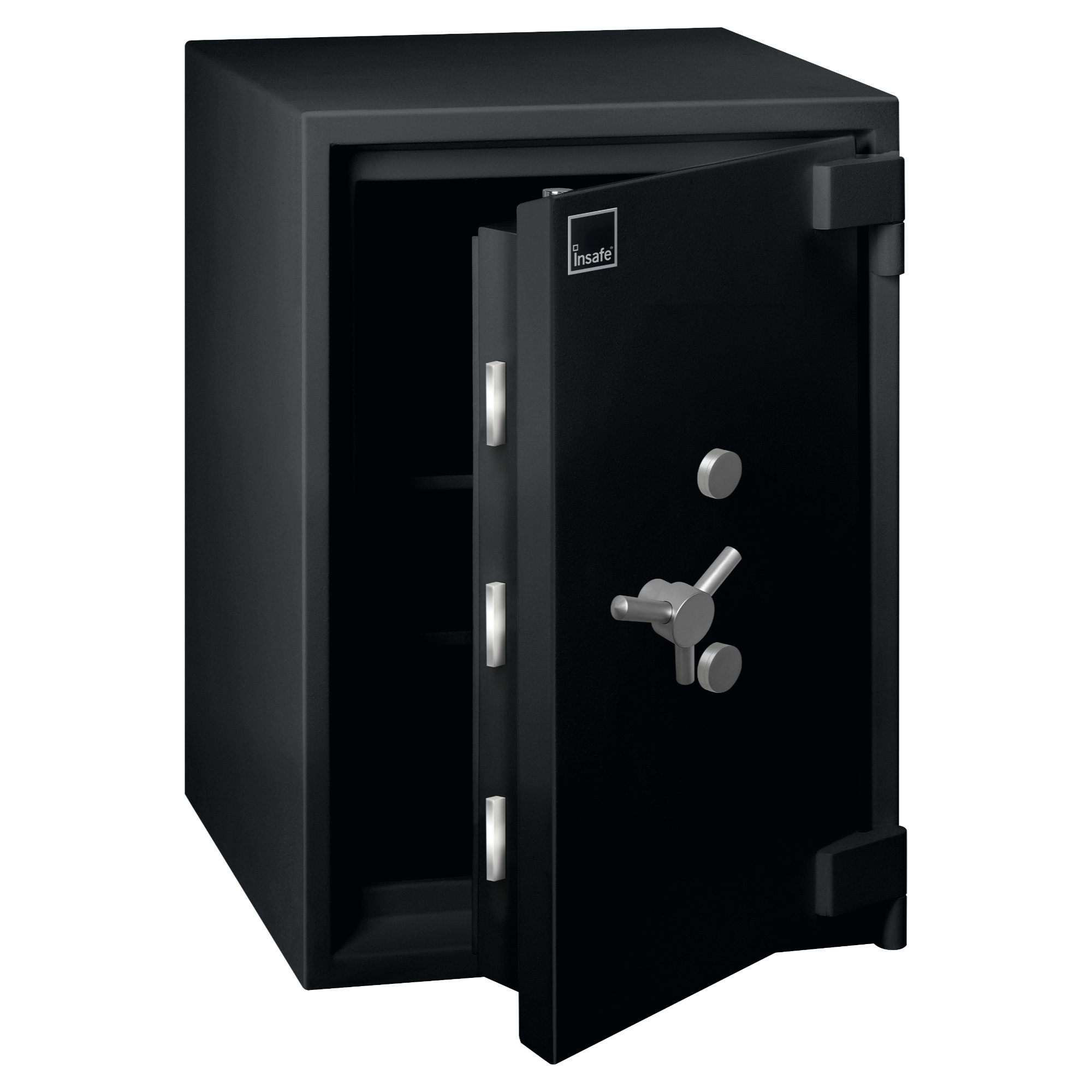
This is the Chubb InSafe Grade 6, one of the very finest domestic safes you can buy. Its features:
- Independently certified EN1143-1 Grade VI for burglary.
- Independently certified to meet Eurograde VI, which means insurance will cover up to €220,000 euro of cash stored within it.
- Independently certified NT FIRE 017-90 for paper (i.e. paper will survive for 90 minutes in a fire inferno).
- Costs about €10,000 inc VAT excluding installation costs (which are a fair bit, this thing is very heavy and needs bolting into reinforced concrete)
Whilst this is a very lovely safe, and the price feels reassuring, you should now expect to be appalled at what Eurograde and EN1143-1 actually guarantees. Those guarantees are not made public, but from plenty of internet sleuthing I managed to reconstruct the ISO definitions which are based around a concept of ‘resistance unit’, or what the ISO standard calls ‘RU’. On that basis, the secure cabinet standard EN14450 means this:
- EN14450 S1 – partial 10 RUs complete 10 RUs
- EN14450 S2 – partial 20 RUs complete 20 RUs
What this means is that to burgle one of the items certified as such, it will depend on your attack tool. A simple crowbar is rated as 7 constant RUs and 7.5 RUs per minute of usage. Therefore to gain entry to a EN14450 S2 certified vault using a crowbar, partial access would take (10 - 7) / 7.5 = 0.4 minutes, and full access would take the same. The secure cabinet standard is literally for filing cabinets so maybe that seems okay, but consider a diamond saw with 35 constant RUs and 10 RUs per minute of usage. Now a EN14450 S2 certified vault is opened in 0.29 minutes, or seventeen seconds. Any thief is going to be in and out long before any police turn up.
Let’s look at the EN1143-1 Eurograde safe minimum guarantees:
- Eurograde 0 – partial 30 RUs complete 30 RUs
- Eurograde I – partial 30 RUs complete 50 RUs
- Eurograde II – partial 50 RUs complete 80 RUs
- Eurograde III – partial 80 RUs complete 120 RUs. Costs about €2.5k.
- Eurograde IV – partial 120 RUs complete 180 RUs. Costs about €4k.
- Eurograde V – partial 180 RUs complete 270 RUs. Costs about €6k.
- Eurograde VI – partial 270 RUs complete 400 RUs. Costs about €10k.
Just to be clear, these have been reconstituted from online forum discussions and may not be accurate. Also, EN1143-1 goes up as far as grade XIII, which is what places like the Bank of England or the Federal Reserve use. Such safes cost a fortune, and even grade VI is not cheap for the residential home owner. It may be useful to know that the most popular safe sold after the very cheap (and completely useless) ones is actually grade III costing about €2.5k, which appears to be as much as most home owners are willing to pay.
How secure are grade III and grade VI safes?
- Grade III: to crowbar, partial access takes no less than 9.73 minutes and full access 15 minutes. With a diamond saw, partial access takes no less than 4.5 minutes and full access 8.5 minutes.
- Grade VI: to crowbar, partial access takes no less than 35 minutes and full access 52 minutes. With a diamond saw, partial access takes no less than 23.5 minutes and full access 36.5 minutes.
Let’s say your house alarm goes off when burglars enter. The response time for any police at best will be fifteen minutes, and probably a lot more for a domestic residential burglary alarm. That’s plenty of time to gain partial access to a Grade III safe which is probably enough to steal any small items in there and make a good escape. Even with a Grade VI safe it’s a fair bet that a well informed burglar will get into that safe and remove any small items long before police arrive. That said, if you put your small items inside a big secure box inside the safe which then forces full access times, a half hour full access time delay probably would put off most well resourced adversaries as a lot can go wrong in thirty minutes e.g. neighbours turn up, police happened to have been driving past nearby at the time etc.
But what if the adversary doesn’t want to steal your cryptocurrency, but just deprive you of it? A raging fire is easy to start within minutes, and it turns out that safes are either good at resisting intrusion OR resisting heat. You can’t have both. So as much as the safe listed above will keep its internals below 175 C for ninety minutes which will no more than sear paper, that is absolutely useless for electronics of any kind such as hard drives, USB drives, or even burned DVDs all of which will expire after about 50 C or humidity above 85% (the humidity matters because many fire proofing solutions are based on gypsum, which emits steam under flame to expel the heat. Said steam quenches the fire, but will also steam cook your electronics). If you’re worried about burglary, you probably ought to also worry about fire and indeed water damage. All are rare but catastrophic events.
At this point you’re probably thinking like I was: anything less than a Grade IV safe costing a cool €4k excluding installation costs is pointless for security. So let’s look at just fire and flood protection only, as that thankfully is far cheaper to safeguard.
Physically securing from fire and flood only
You may remember the secure USB drive I reviewed last post:
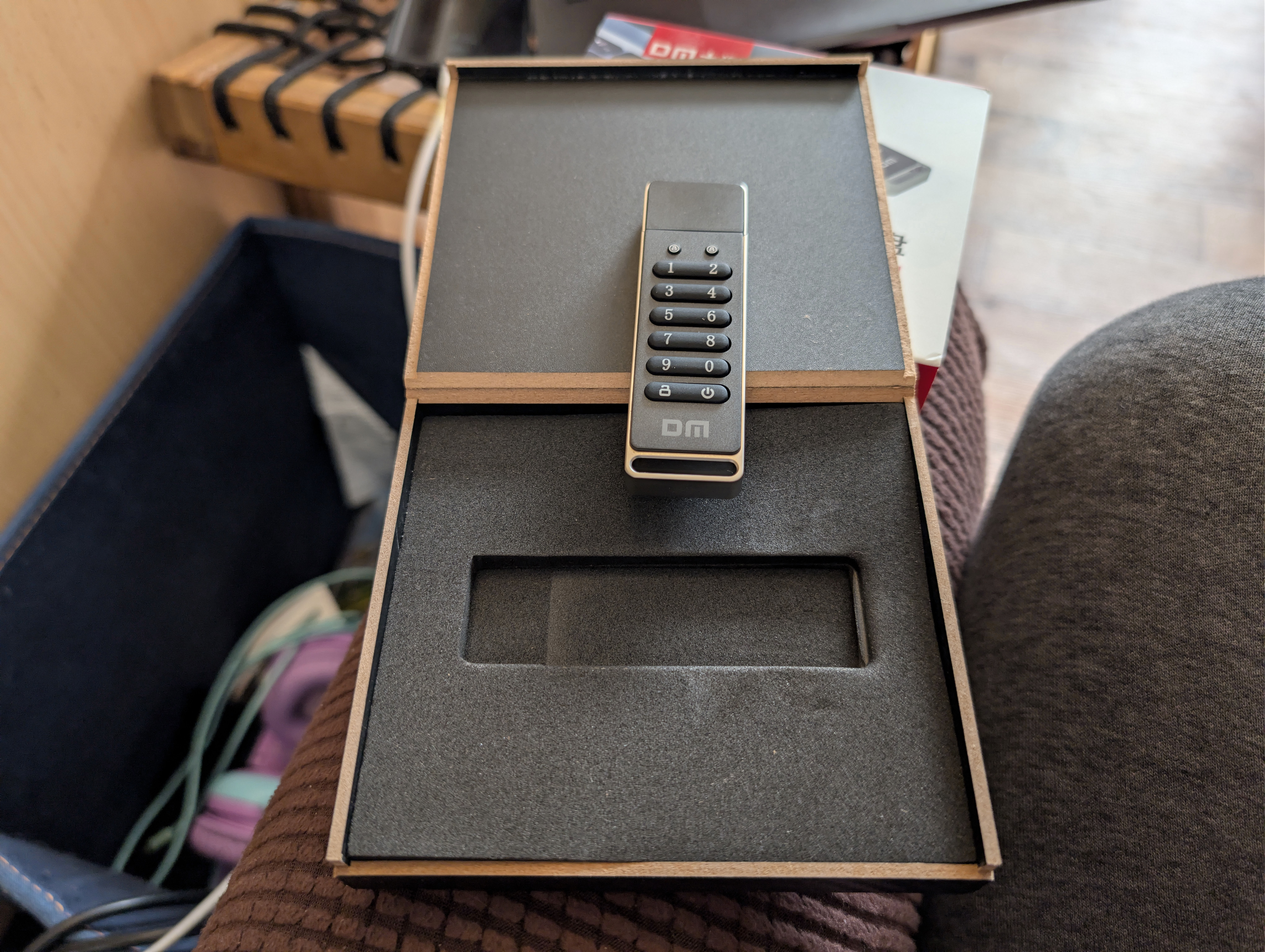
My original plan before I ordered that drive was that I would write a small Python script to:
- Take in the file of BIP39 recovery words.
- Compress that with gzip.
- Feed that into
age, a well known popular file encryption tool with fully standalone portable binaries, and have that file encrypted using a very long password that I have memorised. - Invoke
par2, the venerable parity file generation tool, to create parity files for the encrypted file output.par2can be told to generate many files each filled with many redundant copies. Only one part of one file is necessary to restore any bitrot damage to the original file. - Store the encrypted file + its parity files on an exFAT filesystem on that secure USB drive above.
The plan was that the PIN for the USB drive would be the first line of defence and if entered incorrectly too many times, the drive’s contents would be wiped. Once accessing the drive, the filesystem may have bitrotted, but running the verification script would read all the files which would enable the flash’s FTL layer to spot recoverable bitflips and fix them using internal parity. If the bitflips were unrecoverable, we had a whole bunch more parity to use to restore the contents. Even if the filesystem were so bitrotted that it lost all the files, the very simple exFAT filing system structure should enable a simple linear parse to find enough of the content to reconstruct the file.
That was the plan, but after ordering them I began researching fire, flood and burglary protection and I realised this solution wouldn’t be good enough. For a vault to protect electronic items against fire, it needs to be certified to one of these three standards:
- EN 1047-1 (European), specifically S 60DIS or S 120DIS for diskettes.
- UL 72 (United States), specifically Class 125 for sensitive data.
- NT FIRE 017 (Scandinavian), and look for ‘diskette’.
And as I mentioned above, there is a tradeoff between burglary security and fire and floor security: you can have either, but not both.
The cheapest fully certified fire and floor protection vault for electronics that I could find is the Masterlock LCFW30100 (it has many brand names and price points depending on vendor despite being the exact same product, but the 30100 part number is common to all) for €90 inc VAT. It is certified to UL 72 Class 125 for sixty minutes, so it ticks our boxes above. Be aware Masterlock/SentrySafe sells many such boxes, most of which have no certification at all or have claimed certification from internal testing only. You need to filter out all those products: only choose the ones with the independent, arms length, third party certified testing from a well known standard such as one of the three above. Here it is, and note the lack of a handle which is a real pain as it’s heavy:
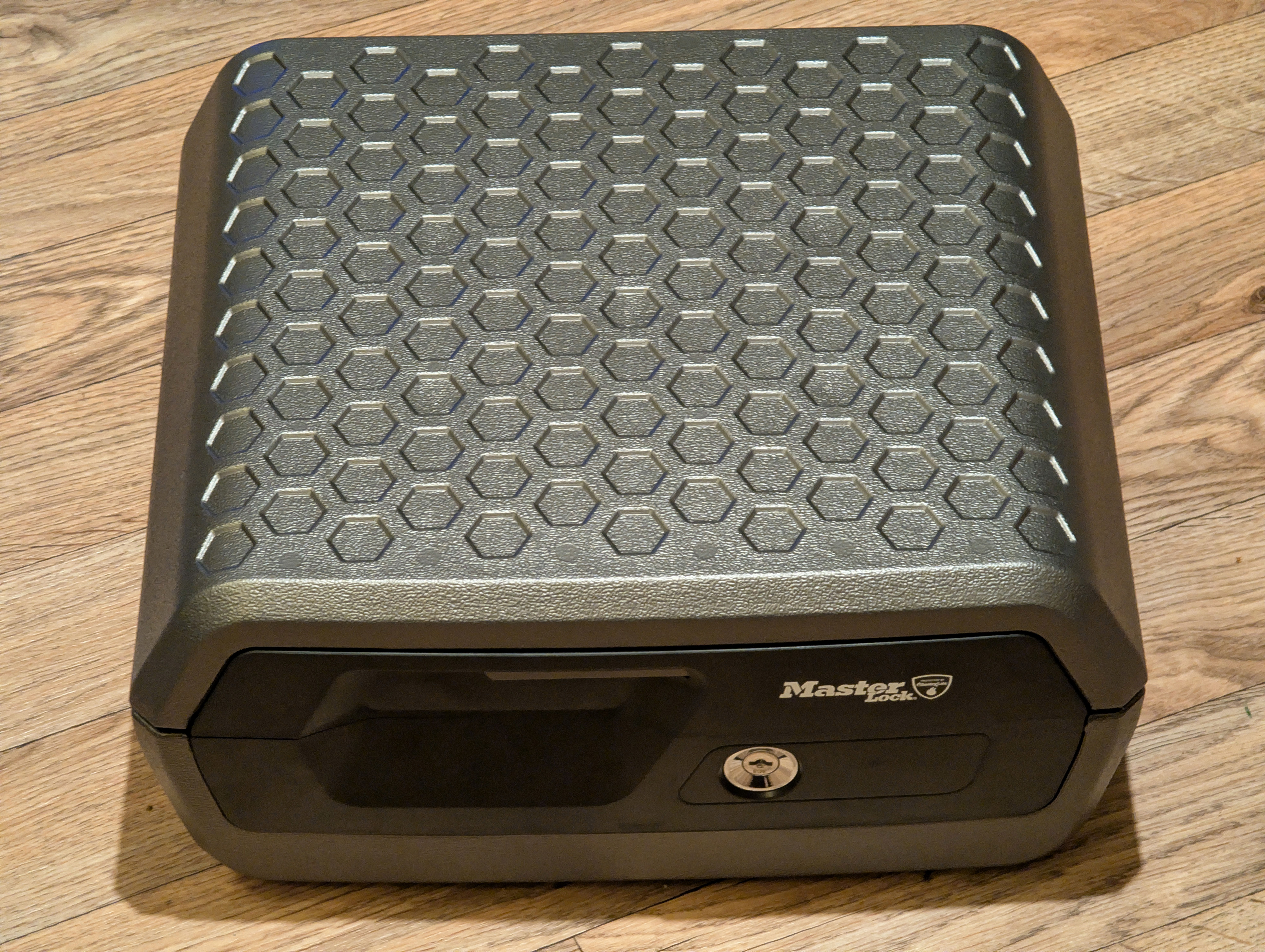
Specifications:
- External: 395x375x193
- Internal: 321x232x136
- Weight: 14 kg
- Fire certification: UL 72 Class 125 for 60 minutes
- Water certification: UL 72 for 72 hours
- Burglary certification: None
There is enough internal space to lay A4 sheets flat without curling the edges (a common problem in US made vaults), and you certainly could fit six to eight portable hard drives along with a fair chunk of A4 pages as you can see:
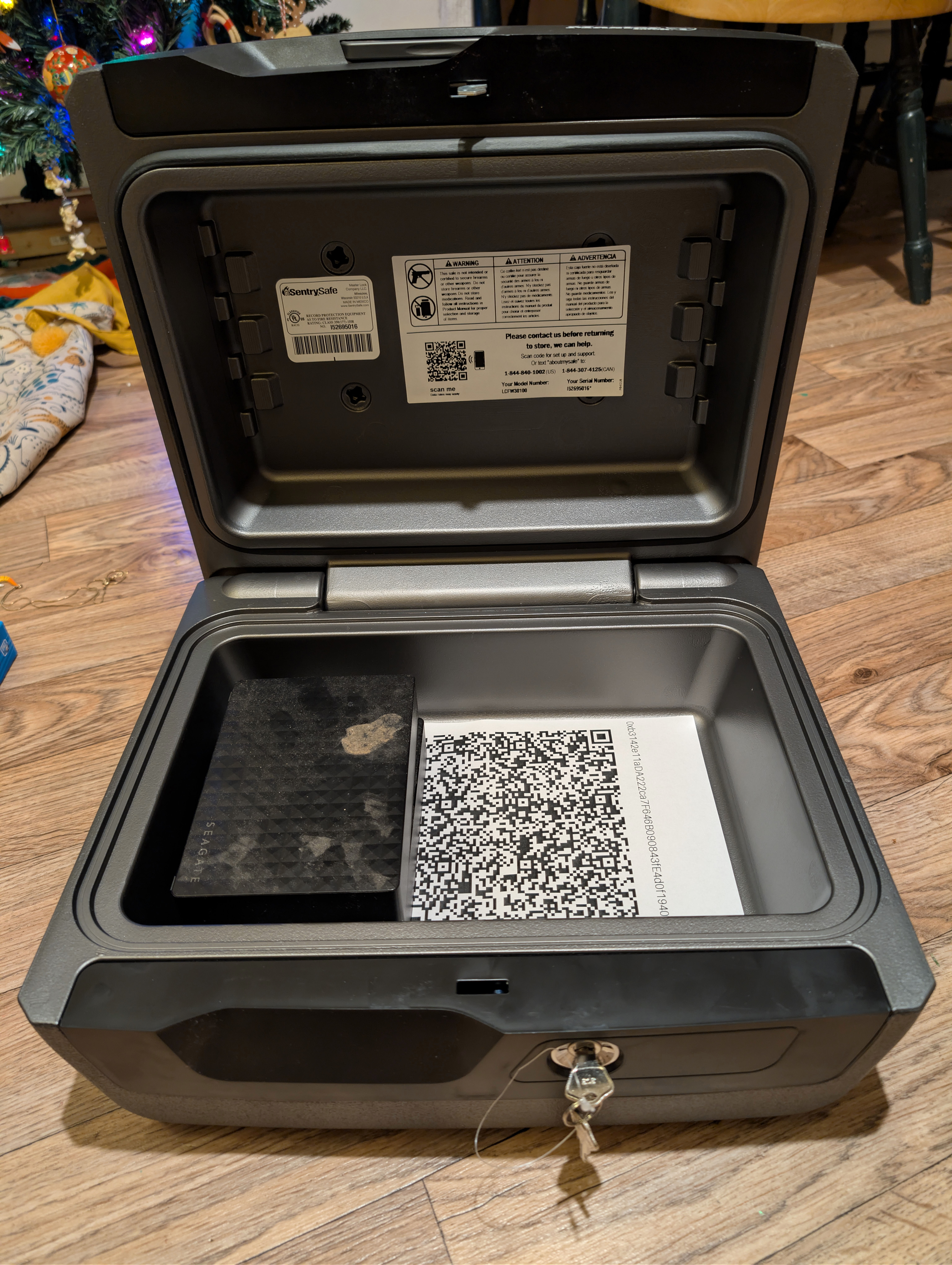
The lock on these is trivial, even a butter knife would open it, and in any case a burglar could just carry it away. So the only physical security here is against fire and flood. It has a rubber seal which looks reasonably okay if cheap, but be aware that these boxes are designed to float on water i.e. the seal is NOT designed to handle any meaningful water pressure. If this vault gets stuck underneath something and it can’t float to the top, water WILL ingress. Furthermore, the fire protection is provided by an encasement of gypsum which emits steam to expel the energy from fire. This is highly effective at keeping the contents cool, but they will get steamed at a low temperature. Therefore, ALWAYS wrap every item in a sealed zip lock bag WITH a bag of desiccant. To keep the inside of the box from becoming nasty after being closed for a long period, you will need a further bag of desiccant loose within the box. And finally, I had a bag of extra long life mini LR44 dual battery powered humidity and temperature meters designed for exactly this fire and forget purpose, they’re about €0.80 inc VAT delivered each on Aliexpress, so for use cases like this they’re perfect. The mini meter is just to the bottom left of my main house meter here:
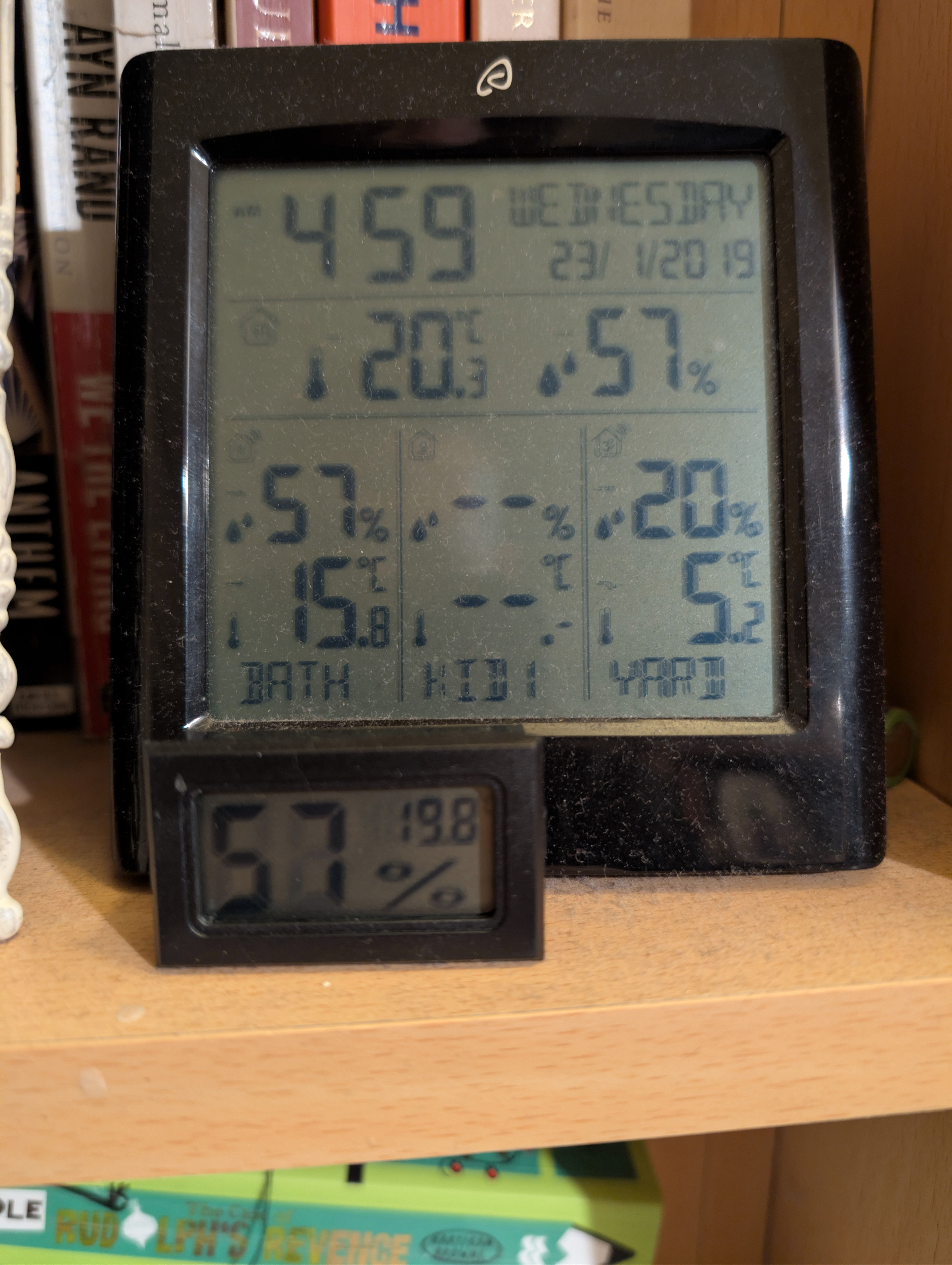
The mini meters being exceptionally cheap aren’t terribly accurate, maybe +/- 2% for the humidity and +/- 2 C for the temperature. But they run for well over a year on the two LR44 batteries, so I don’t really care about accuracy – they’re only there to tell me when to refresh the desiccant bags in the microwave. If you have a fancy safe, you also need to place fresh desiccant bags within every time you open it, otherwise they also go nasty inside – airtight safes are like a fridge which isn’t turned on.
In case you’re wondering if this box would actually survive a fire, you can find people testing the very cheapest and smallest L1200 box in the same range as this one in YouTube videos. That box is certified to UL 72 Class 350 for 30 minutes i.e. for paper only (though it makes uncertified claims about data protection), and it has much thinner walls as well as a handle (so why the more expensive model is missing a handle … I just don’t know!). I watched several test videos, and while a bag of candy in the box melts readily which happens at about 45 C (i.e. goodbye your electronics), paper survived a thirty minute inferno just fine if a little scorched but it was still readable. For the box I’ve listed above with much thicker walls and an independent certification, I’m not personally sure if electronics would always make a full hour within an inferno – I think it’ll depend where the item is within the box and if your electronic item is near a weak spot it’ll be dead – but I think paper probably would survive sixty minutes or more.
So, we have a solution for fire and flood local security. What about offsite backup?
Safety deposit boxes
Safety deposit boxes used to be easily and cheaply available in most local bank branches, but they’ve very much disappeared from the market in recent years. A number of private providers have sprung up with varying quality and price points. You can, for example, get a safety deposit box with Harrods in London for about £500 per year, and Harrods does have the big advantage that ultra wealthy types may be there anyway to shop so it’s then a very convenient place to also keep valuables. I definitely don’t shop in Harrods, and I suspect neither do most of the readers here.
For more normal people, most would look for a provider in the nearest big city, but certainly in Ireland’s case that means very little competition and unsurprisingly prices are high starting from €250 inc VAT per year upwards in what seem to me not particularly secure facilities.
Heathrow Airport has inside-customs secure storage for those able to afford it. Because items stored there never enter Britain, they never pass customs and they don’t ‘exist’ from the perspective of the British taxman. Usefully, you can ‘borrow’ items held there for up to a week, so you can take your Porsche sports car on a weekend jaunt and never pay a penny of tax. The storage fees are eye watering of course, this is very much a service for the ultra wealthy.
For the ordinary person, there is a legion of secure storage choices just outside Heathrow Airport, and due to competition prices are low and quality can be very high. The cheapest I found starts from £70 per year in what appears to be a very impressively secured building and with 24-7 access. Sure, now you need to fly to Heathrow and back, but that’s probably more convenient than driving to Dublin and back if you don’t live in Dublin. Plus, these boxes would be far more secure.
That said, staff of course do always have access to all safety deposit boxes – yes you the owner have a key, but it’s easy enough to get into one of those boxes with a diamond saw. If you keep your cryptocurrency wallet backup words written on a piece of paper in such a safety deposit box, it’s game over if anybody gets in there. I think the biggest win for this option would be firstly fire and flood safety, and it’s definitely more secure against burglary than most on-premises safes. You wouldn’t want to store anything where staff theft is a big risk to them, a paper list of crypto wallet words is definitely very unwise, perhaps even a keyfob might be a touch too risky, however as a cold offsite ‘if all else fails’ backup they do look very interesting. Indeed, a printed QR code might be just exactly the right thing one should store in a safety deposit box.
We now have a solution for onsite fire and flood protection, and offsite fire and flood protection. We don’t have a solution to theft yet. What we now need is a way of storing that paper backup of your private key words still on paper so it’s resilient to fire, but in a form which is useless to anybody but you. Which implies more cryptography …
Cryptographic theory
On the one hand, if asymmetric encryption ever gets broken by an advance in
quantum computing, then most of cryptocurrency ceases to be viable, and by
definition securing your wallet’s private keys more than the encryption
level used by cryptocurrencies is moot. On the other hand, getting up to
the 256-bit grade security which the XChaCha20-Poly1305 symmetric
encryption
which age uses using a passphrase input is challenging –
passphrases that humans can reliably memorise tend to not have much entropy.
There are websites which will check a password for how much entropy it has, but for obvious reasons you must never ever use such a service. So I wrote my own into my convenience Python script:
cpassword = gzip.compress(password.encode('utf-8'))
password_entropy_estimate = (len(cpassword) - 20)
print(f"That password of length {len(password)} is estimated to have an **upper bound** of {password_entropy_estimate * 8} bits of uniqueness.")
if password_entropy_estimate < 20:
    print("    WARNING: You really should use a password with at least 160 bits of uniqueness!", file = sys.stderr)
password_crack_time = pow(60, (password_entropy_estimate - 7)) / 10000000
password_crack_time2 = pow(60, (password_entropy_estimate / 2 - 7)) / 10000000
print(f"That password is estimated to take {password_crack_time} years to crack using 120 million top range 2023 GPUs. Be aware that future quantum computers may reduce that to {password_crack_time2} years.")
if password_crack_time2 < 1:
    print("    WARNING: You really should use a password which would last a year being brute forced by a quantum computer!", file = sys.stderr)
So we take the UTF-8 bytes of the passphrase, gzip compress it, and subtract
off the twenty bytes of gzip headers to give how many bytes gzip managed to
compress the input into. This will be an upper bound estimate of the passphrase
entropy, and because gzip isn’t an especially good compression algorithm it
will be an upper bound quite a bit above reality. One is of course tempted to
use a better compression algorithm – LZMA
should be a much more accurate upper bound estimator – but I didn’t want to
use any dependencies which required anything not pure Python.
Having got the upper bound estimate of bits of entropy, we use the equation
(60 ^ (bytes of entropy - 7)) / 10000000 to estimate the number of years required to
brute force that password using 120 million top range 2023 GPUs. I suppose
that will need explaining:
- Firstly I took how long to currently brute force a
bcryptencoded password from Hive Systems:
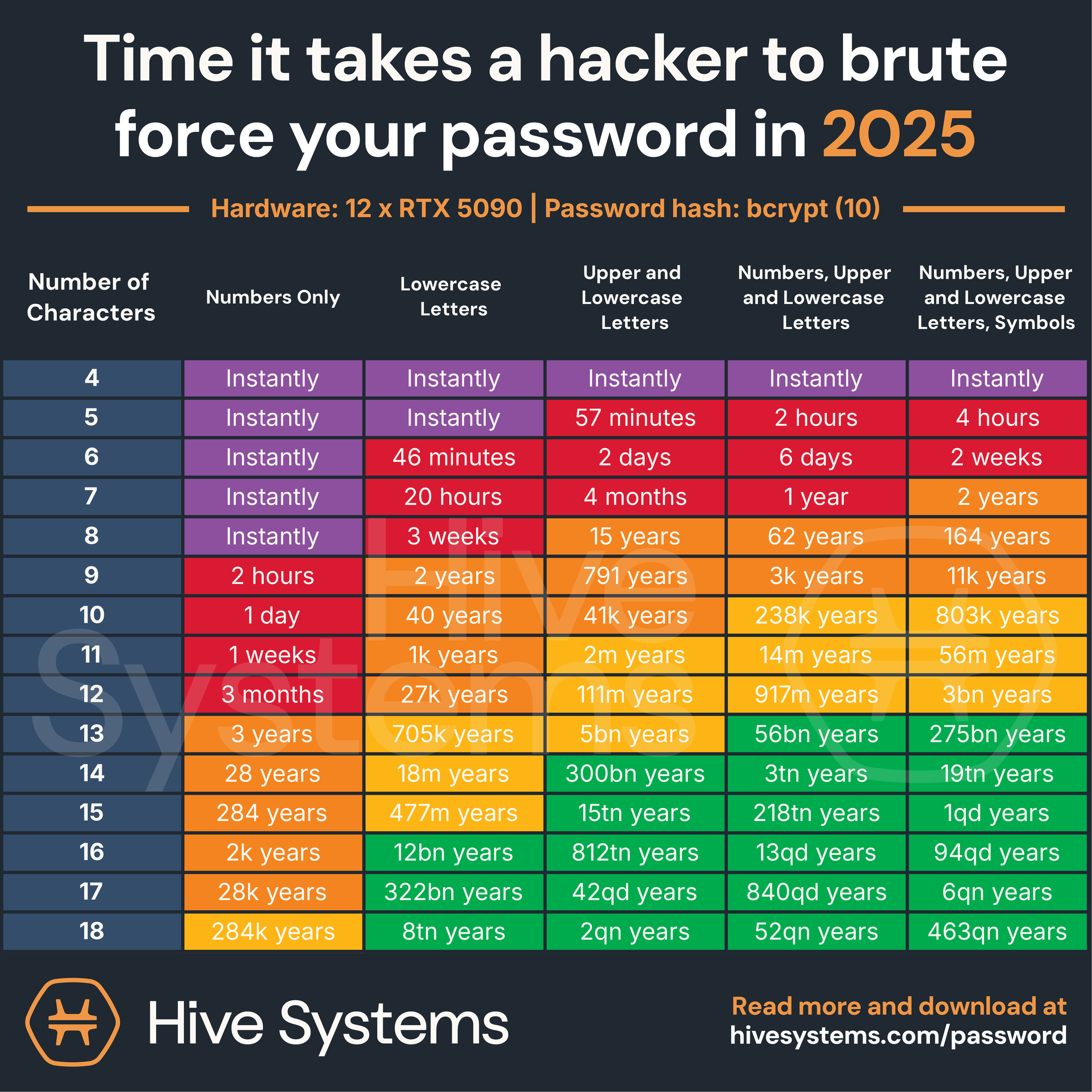
nVidia has sold ~2 billion cards ever, so 120 million of the very newest cards seems a reasonable upper bound.
This table is for twelve GPU cards, so if one divides the numbers in this table by ten million, you get the brute force time for 120 million GPUs. However, this table is for brute forcing
bcryptconfigured with work factor5(i.e. 32 iterations).age, on the other hand, usesscryptwith a work factor of18. Unlikebcryptwhere work factor determines only iterations,scrypt’s work factor determines both memory consumption and iterations. A work factor of18I believe means a table sized 256Mb must be generated and randomly accessed which takes between half a second and two seconds depending on your CPU and memory. That’s intended to overwhelm a GPU’s RAM quickly preventing parallelisation, so your RTX 5090 with 32 Gb of RAM could only perform 128 concurrent brute force attempts, far below the 21,760 concurrency capability it has in hardware. If you used a H200 instead with its 141 Gb of RAM, now you get 564 concurrent brute force attempts. I’m sure it’s possible to optimise that naive case, so I’ve assumed thatscryptcosts at least six times more effort per character thanbcrypt, and therefore a passphrase with entropy no better than the0-9digits is worth the ‘numbers, upper and lower case letters’ column. That is almost certainly unfair toscryptwhere what (very old) white papers I could find thought a factor of sixty rather than six was more likely, but I suppose it’s better to be safe than sorry.In case you’re wondering if it would be faster to attack
XChaCha20-Poly1305, it uses a 192 bit salt with the ChaCha20 cypher which takes a 256 bit key. This should be quite resistant to even a quantum computer for decades to come (symmetric cyphers are not as vulnerable to quantum attack as asymmetric cyphers).
In any case, I have placed my Python scripts at https://github.com/ned14/redundant_secret_storer. Here’s an example of it in use:
./encode_file.py 0xb3142e11aDA222ca7F646B090843fE4d0f19409E.txt
Filename compressed length 182 '0xb3142e11aDA222ca7F646B090843fE4d0f19409E.txt'
Password (min 16 mixed letters, capitalisation, numbers and symbols): ***
That password is 3 characters long! Enter it again!
Password (min 16 mixed letters, capitalisation, numbers and symbols): **********************
That password of length 22 is estimated to have an **upper bound** of 176 bits of uniqueness.
That password is estimated to take 4.70184984576e+19 years to crack using 120 million top range 2023 GPUs. Be aware that future quantum computers may reduce that to 1.296 years.

age will now ask you for the same password twice securely:
Encrypted file '0xb3142e11aDA222ca7F646B090843fE4d0f19409E.txt.age' is 488 bytes long.
Encrypted file is saved as a printable QR code at '0xb3142e11aDA222ca7F646B090843fE4d0f19409E.txt.age.png'.
WARNING: Creating recovery file(s) with 800% redundancy.
Block size: 4
Source file count: 1
Source block count: 91
Recovery block count: 728
Recovery file count: 8

Opening: 0xb3142e11aDA222ca7F646B090843fE4d0f19409E.txt.age
Wrote 2912 bytes to disk
Writing recovery packets
Writing verification packets
Done

Decode files script will once again ask you for the password securely:
The decode files script output exactly matches the input file content!

Decode QR code script will for a final time ask you for the password securely:
The decode QR code script output exactly matches the input file content!
The first thing which strikes you is the potential power of quantum computing: 160 bits of entropy would be very crackable. Our 176 bits here would take 1.296 x 120 million years which looks safe, but I daresay if anybody manages to build a viable quantum computer they’ll churn them out by the tens of million. In any case, 200 bits of entropy will remain uncrackable forever even with a quantum computer – at least for symmetric cyphers, and 256 bits is many orders of magnitude safer again.
The encode script invokes the decode script at the end to make sure decoding from file and decoding from QR code produce identical decrypted output as the original input. The encode script outputs these files:
ls -l 0xb3142e11aDA222ca7F646B090843fE4d0f19409E.*
-rw-r--r--@ 1 ned  staff    238 29 Dec 20:42 0xb3142e11aDA222ca7F646B090843fE4d0f19409E.txt
-rw-r--r--  1 ned  staff    364  2 Jan 01:01 0xb3142e11aDA222ca7F646B090843fE4d0f19409E.txt.age
-rw-r--r--  1 ned  staff   2272  2 Jan 01:01 0xb3142e11aDA222ca7F646B090843fE4d0f19409E.txt.age.par2
-rw-r--r--@ 1 ned  staff   5561  2 Jan 01:01 0xb3142e11aDA222ca7F646B090843fE4d0f19409E.txt.age.png
-rw-r--r--  1 ned  staff  21808  2 Jan 01:01 0xb3142e11aDA222ca7F646B090843fE4d0f19409E.txt.age.vol000+91.par2
-rw-r--r--  1 ned  staff  21808  2 Jan 01:01 0xb3142e11aDA222ca7F646B090843fE4d0f19409E.txt.age.vol091+91.par2
-rw-r--r--  1 ned  staff  21808  2 Jan 01:01 0xb3142e11aDA222ca7F646B090843fE4d0f19409E.txt.age.vol182+91.par2
-rw-r--r--  1 ned  staff  21808  2 Jan 01:01 0xb3142e11aDA222ca7F646B090843fE4d0f19409E.txt.age.vol273+91.par2
-rw-r--r--  1 ned  staff  21808  2 Jan 01:01 0xb3142e11aDA222ca7F646B090843fE4d0f19409E.txt.age.vol364+91.par2
-rw-r--r--  1 ned  staff  21808  2 Jan 01:01 0xb3142e11aDA222ca7F646B090843fE4d0f19409E.txt.age.vol455+91.par2
-rw-r--r--  1 ned  staff  21808  2 Jan 01:01 0xb3142e11aDA222ca7F646B090843fE4d0f19409E.txt.age.vol546+91.par2
-rw-r--r--  1 ned  staff  21808  2 Jan 01:01 0xb3142e11aDA222ca7F646B090843fE4d0f19409E.txt.age.vol637+91.par2
The parity files are intentionally large as most flash storage devices will either corrupt whole 512 byte or whole 4096 byte pages if bit rotted – and by ‘corrupt’, I usually mean that you get a zero bit filled read because the attempt to read fails with an error. As the original encrypted file is almost always well below 512 bytes, you really do need lots of parity redundancy, and distributing it across both file count and file length should be resistant to even quite severe bitrot.
The printable QR code
The PNG file output is a printable QR code, and it looks like this printed:

Redundancy is easy to implement here: just print more copies of this page and store them in multiple physical locations.
The script does nothing magical here. It takes the .age encrypted
file which I’ve hopefully proven by now is utterly useless to anybody
without the passphrase. It base64
encodes it to avoid any potential
mojibake unicode issues in any future processing pipeline by turning
bytes into six bit clean ASCII, and then outputs a QR code for that
ASCII string. To reverse the process, use any QR code reader, feed
what is output into base64 -d, and there’s your .age file back
again. Obviously the decode script will do this for you, and we’ll
give that a try below.
QR codes are not something I had particularly looked into until now, but they’re really quite clever. They use a Reed-Solomon encoding to incorporate about 15% redundancy. If the image is poor, the QR code is damaged in some way, or for any other reason, up to 15% of the image can be unparseable and the original content will be decoded without any errors. Very nice!
Let’s try feeding that photo to the decode script:
./decode_file.py --qrcode PXL_20251231_003728204.jpg
Traceback (most recent call last):
  File "/Users/ned/secure_usb_drive/./decode_file.py", line 39, in <module>
    res = subprocess.run(['zbarimg', '--raw', args.filename], capture_output = True, check = True)
  File "/opt/homebrew/Cellar/[email protected]/3.14.2/Frameworks/Python.framework/Versions/3.14/lib/python3.14/subprocess.py", line 577, in run
    raise CalledProcessError(retcode, process.args,
                             output=stdout, stderr=stderr)
subprocess.CalledProcessError: Command '['zbarimg', '--raw', 'PXL_20251231_003728204.jpg']' returned non-zero exit status 4.
zbarimg --raw PXL_20251231_003728204.jpg
scanned 0 barcode symbols from 1 images in 1.5 seconds

WARNING: barcode data was not detected in some image(s)
Hmm. I tried a few things at this point, including cropping out everything bar the barcode but nothing seemed to work. Eventually Google’s search AI suggested this:
magick PXL_20251231_003728204.jpg -threshold 50% test.png
which yields this black and white image which has been stripped of all image metadata:
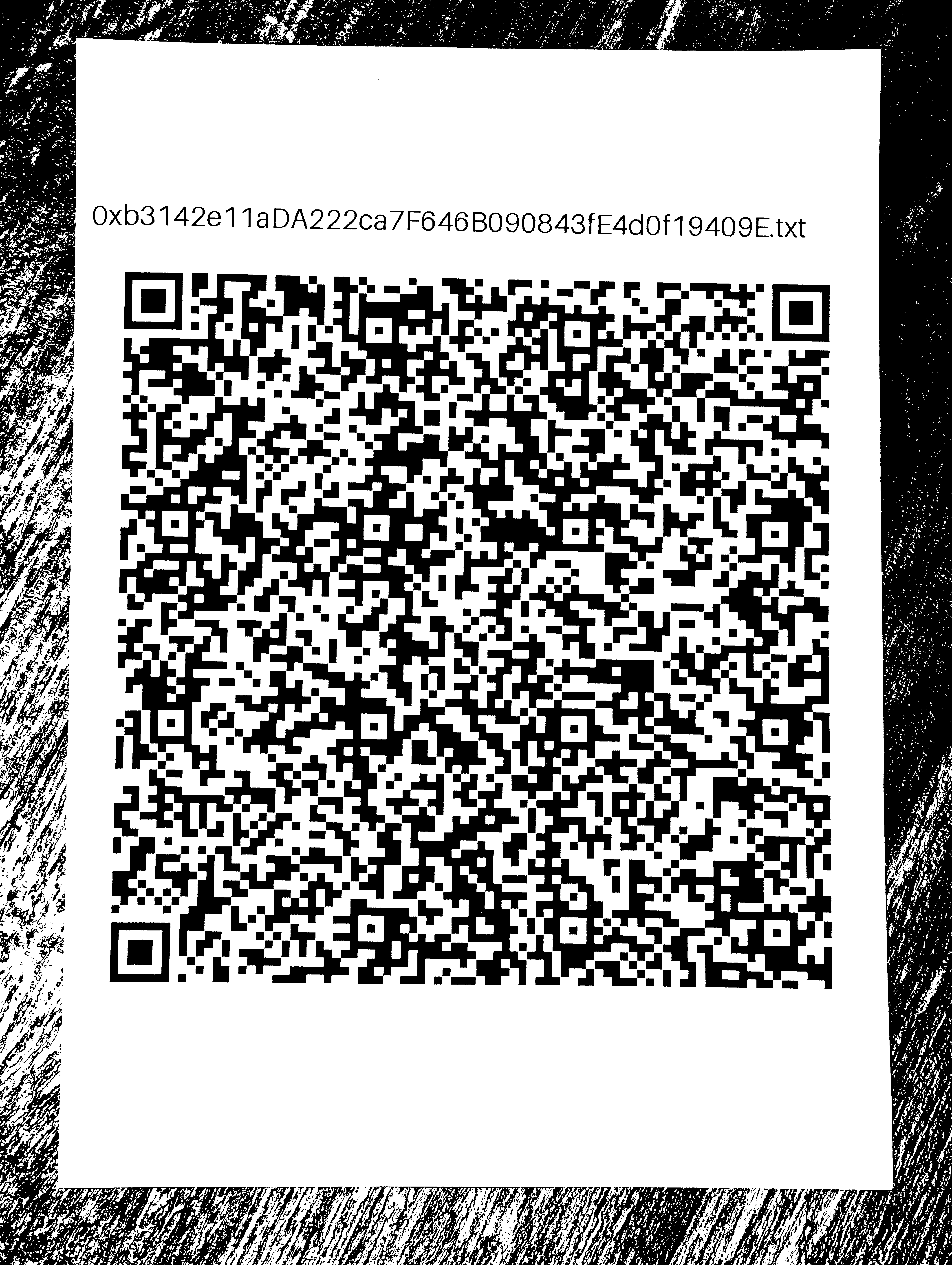
And voilà that now works a treat, so I’m going to claim that zbarimg silently
fails when it sees ICC colour profiles for some reason (I know it uses
ImageMagick internally, so I can see zero reason it can’t render input
into black and white by itself):
./decode_file.py --qrcode-and-decrypt test.png

age will now ask you for the password securely:
---
1. swear
2. affair
3. copper
4. soup
...
In case you were wondering, I only chose zbarimg for convenience, it is
generally reckoned to not be good at parsing anything but the simplest
input photos, but it’s easy to install and configure. If you want
something reckoned to be a best in class QR
code from photo parser, look into zxing which comes in Java and C++
editions. The C++ edition is thought to be the more capable with
difficult images. Be aware that the setup and installation is non-trivial,
C++ zxing
can do clever tricks like read RAW images off camera sensors
and use the extra information to figure out a readable QR code. I only
mention this in case readers ever have to decode a nearly entirely
burned printed QR code.
Summary and Conclusions
I have described above my thoughts on how best to secure a very short very high stakes secret such as a cryptocurrency wallet private key against theft, fire and flood in both onsite and offsite locations. I have supplied:
Scripts to generate printable QR codes and parity protected encrypted backup of your BIP39 backup word list.
Suggested affordable physical security solutions in the form of a fire and floor proof vault and a keycode encrypted secure USB drive for the paper printed QR codes and parity protected files.
A list of the most popular hardware keyfobs for cryptocurrency, which are probably now your weakest point of failure apart from friends and family.
You will still need to supply for yourselves:
A secure environment ideally with zero internet access which as far as you can ensure it has no keylogging nor recording of any kind, but which can still run the Linux or Mac standalone binaries supplied within https://github.com/ned14/redundant_secret_storer. You almost certainly should not use the binaries in that repo and instead replace them with your own ones, as they may be compromised.
To my best current knowledge, the most secure environment easily available to retail consumers is a dedicated sub user with no apps installed on a GrapheneOS running device. GrapheneOS lets you install a Linux subsystem within each user account which is held within its own secure subpartition – this lets you run ARM64 Linux programs. You may also find it useful to know that GrapheneOS has an experimental desktop display mode, if enabled then when you plug the device into a monitor you’ll get a desktop UI and it’s easy to hook up a keyboard and mouse and then you’re pretty much working on a standard Linux system, except this one is a lot more secure.
Obviously do NOT install anything into that Linux subsystem nor into that dedicated clean subuser. Do NOT save the unencrypted text file of the BIP39 words onto anywhere bar within that Linux subsystem partition i.e. run these scripts to generate the encrypted outputs, and then copy those out elsewhere. Do NOT ever let the unencrypted file touch a USB drive as deleting files on exFAT doesn’t destroy the contents. Recent Androids encrypt each user profile’s files per profile so no other profile can get access to the unencrypted file content, however you almost certainly ought to destroy that Linux subsystem when you’re done encoding files in order to ensure that the unencrypted input file is definitely destroyed – also, it’ll free up a bunch of phone storage.
If you don’t have a GrapheneOS device, a completely clean installation of ChromeOS Flex with nothing else bar the Linux subsystem installed is probably the next least worst solution. You should dedicate a PC to this, and never, ever, ever, use it for anything else. Most of us techie types have spare old PC hardware kicking around so that’s easy enough to arrange, and I’ve been impressed at how ChromeOS Flex appears to ‘just work’ even on quite old hardware (though it helps to have integrated graphics). The reason why ChromeOS is a good choice is because like Android it has an immutable sysroot i.e. it won’t boot if somebody modifies any of the core installation (note: you need to turn on Secure Boot in the BIOS for this). That confines viruses, keyloggers etc to running under user applications, and if you don’t run any of those then it’s challenging to capture secrets from such an OS design. Also, like Android it encrypts all the files under a login for just that login, so there is no way anything outside code running under your user login can see the content of unencrypted files. Still, I’d still wipe the Linux subsystem when you’re done, just in case.
Finally, if you have neither a GrapheneOS device nor a spare PC for ChromeOS Flex, a dedicated clean user account on a recent Apple Mac is probably not awful. It is important that the device AND OS version are recent, because it was only recently that Mac OS moved to an immutable sysroot design, and only recent Mac hardware has a secure processing unit which guarantees no boot if the sysroot has been modified. Absolutely do NOT use your normal user account, but a brand new clean user is probably reasonably safe on modern Apple Silicon Macs – though, to my best current knowledge, I don’t believe Macs encrypt each user’s home directory on a per-user basis, so any unencrypted files are theoretically accessible by another user (the whole storage is always encrypted though on Apple Silicon Macs). I’d choose either of the above solutions first though, because Macs being expensive devices almost always will be used for general purpose use and that exposes them to infection and hijacking. The separate user account helps with that, but it’s much better to use a completely clean device not used for anything bar this purpose.
And once again: make sure there is no internet connection when working with these secure devices. 99% of keyloggers and screen capturing malware uploads what it captures live or semi-live. If they don’t have an internet connection, and never get an internet connection, they can’t upload what they capture. For the remaining 1% able to capture and transmit without an internet connection, you are being attacked by a very well resourced nation state and to be honest you have far more pressing problems than loss of your cryptocurrency.
A high entropy passphrase which isn’t ever used anywhere which could be keylogged or otherwise grabbed, but is still memorable because if you forget it when you need it, you are right out of luck. You therefore almost certainly ought to practice recovery every six months or so to make sure your memory is not failing.
Another big problem here is how to securely communicate that passphrase to your family in the event of untimely death – you don’t want to make it easy enough that a wayward family member might run off with all your cryptocurrency, but you also don’t want to make it so hard your family won’t be able to recover anything at all if you suddenly died. I don’t have good answers for this part – it’s a tradeoff of competing factors, and to be honest, you’re not going to stop a highly motivated family member from running off with the lot if they are so minded. It is what it is.
You need to periodically practice – in full – the cycle of recovering a hardware keyfob from its backup. That means taking a picture of the printed QR code, decoding it, launching your secure environment, performing the decryption, factory resetting a keyfob, and restoring it from backup, and then making absolutely sure that that restored keyfob works in full. This implies that you ought to have at least two, ideally three, keyfobs and you probably ought to rotate the backup restoration cycle with each in turn.
A bit of nous around using cryptocurrency DeFi. Even with all the cryptographic operations being done on non internet connected hardware like those keyfobs, if you sign away coin to a bad smart contract, you absolutely lose that coin, and possibly all other coin in the same wallet. Figuring out what is a good or bad contract is far harder than it should be – just because you’re on the right website doesn’t mean somebody hasn’t swapped out a contract, or found a bug in an existing contract which lets them run off with all your cryptocurrency. Even if you agree to one ETH to a smart contract, it is possible that all the ETH in your wallet gets drained. You must therefore never, ever, use cold wallets with any smart contract ever apart from – maybe – non-custodial staking contracts with very well known and highly regarded entities. In other words, only use warm wallets with DeFi, and transfer from cold wallets to warm wallets as needed never keeping anything more than a minimum in your warm wallet.
Me personally I’ve always therefore not been particularly keen on cryptocurrency for retail investors – it all has far too many sharp edges which makes it more risky than even spread betting or compound derivatives. I certainly sweat any time I ever do anything with cryptocurrency – it fills me with anxiety, and I don’t like the experience, it’s all far too stressful. But that’s probably because I actually understand how it works. 99.9% of users out there don’t, and live in blissful ignorance. The fact that more don’t get fleeced more regularly is quite surprising, if I am honest.
As you’re probably inferring by now, I expect to receive a sum of cryptocurrency in about a year from now. This is due to me having been the eighteenth hire to Monad and I worked there from when they were very small until last June, when I began to look too expensive for my value added. The reason I looked so expensive was because I chose mostly cash compensation and not much future token compensation on the basis that most startups fail. This one did not, and its mainnet launched in November and is running without issue since.
Early staff have to wait a year before their token allocations get released to them, so around December 2026 I’ll get mine. It’ll be a nice sum, but more an income supplement than income replacement – I expect to keep having to work for many years more yet before I can retire. Obviously if I had a time travel machine I’d tell my past self to choose less cash and more future token compensation, but I made the right call at the time with the information I had to hand and I don’t regret my choice except in fleeting moments of ‘what if?’. Oh well.
My expectation is that due to steep Irish capital gains taxes of 33%, I’ll be HODLing the token allocation as I can’t buy and sell tokens without creating a taxable event. So I’ll be staking the token allocation and whatever staking income from that will get even more steeply taxed at income tax rates of about 50%, but under Irish tax law you get no choice in that: crypto income is income taxed as soon as you earn it. And you can’t swap the tokens into any other less taxable kind without handing 33% of them to the Irish government in tax. So I’ll be trapped into annually handing half the staking proceeds to the government in tax going forth i.e. I can’t get out of cryptocurrency, despite the sweats it gives me, as it’s just too tax expensive.
Because I need to practice all this cryptocurrency stuff and get used to it, I’ve enacted now all the measures which should be suitable into the long term and I’m currently practising with a small sum of $MON I bought after mainnet launch using everything described above. I intend to practice every month so in a year from now I’ll have it all down to a well practised routine which shouldn’t easily get forgotten.
This post has been three months in the making! I hope you found it interesting and useful. Next post almost certainly will be that other post three months in the making about my family history. Until then, Happy New Year and I hope y’all had a great Christmas break.
| Go to previous entry | Go to next entry | Go back to the archive index | Go back to the latest entries |